What this looks like in real projects.
Use cases show not only the process but the surroundings: roles, systems, requirements and controls. Two are set out in full here; five more can be clicked through as models.
The most common question
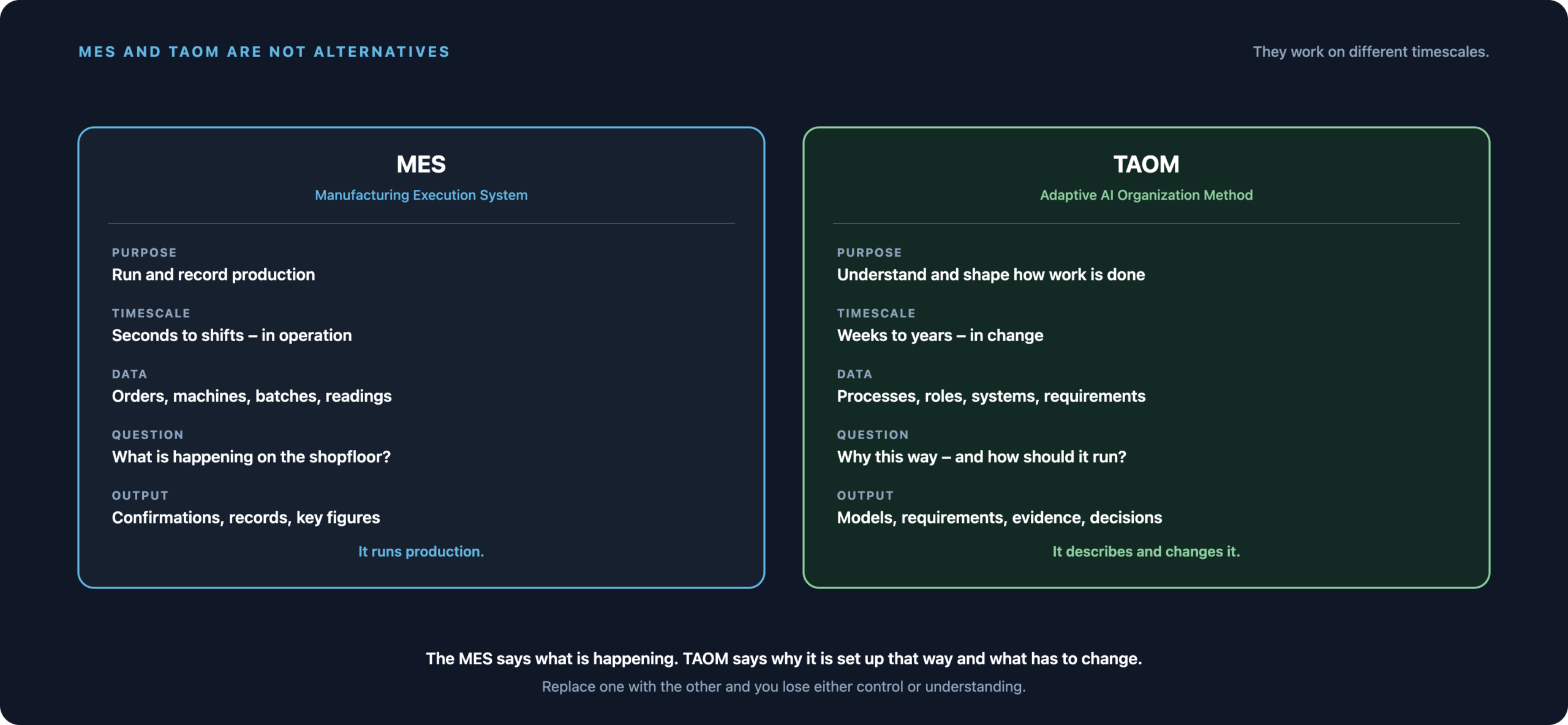
“We already have an MES – so why TAOM?”
A manufacturing execution system controls and records production: scheduling orders, capturing machine data, tracking batches, recording measurements, reporting back to the ERP. It is the system in which production läuft.
Why an MES is used
Because there is a gap between ERP and machine. The ERP knows the order, the machine knows the cycle – in between you need something that schedules, reports back, tracks batches and enforces checks before material moves on.
In regulated industries there is more: without a complete record, nothing may be shipped.
What an MES does not do
It does not know warum an inspection step exists, which obligation demands it, which requirement triggered it, or what happens if you change it. It documents the execution, not the intent.
TAOM fills exactly that gap – with this boiler house as the example or in general with the Digital Twin.
Pictures instead of paragraphs
The same boiler house, two views
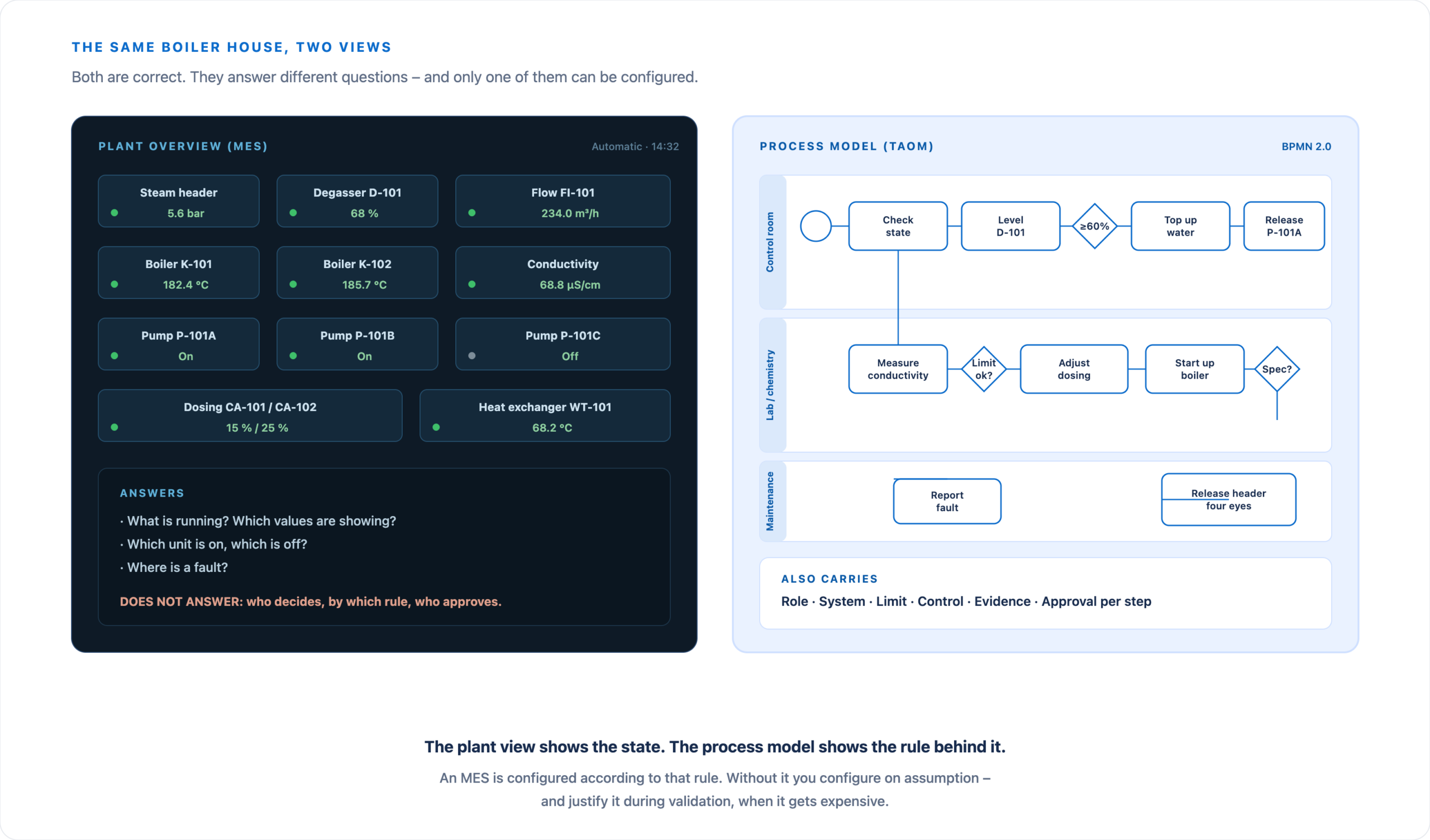
On the left a plant overview of the kind that hangs in every MES. On the right the same section as a process model. Both are correct – but only one of the two can be configured.
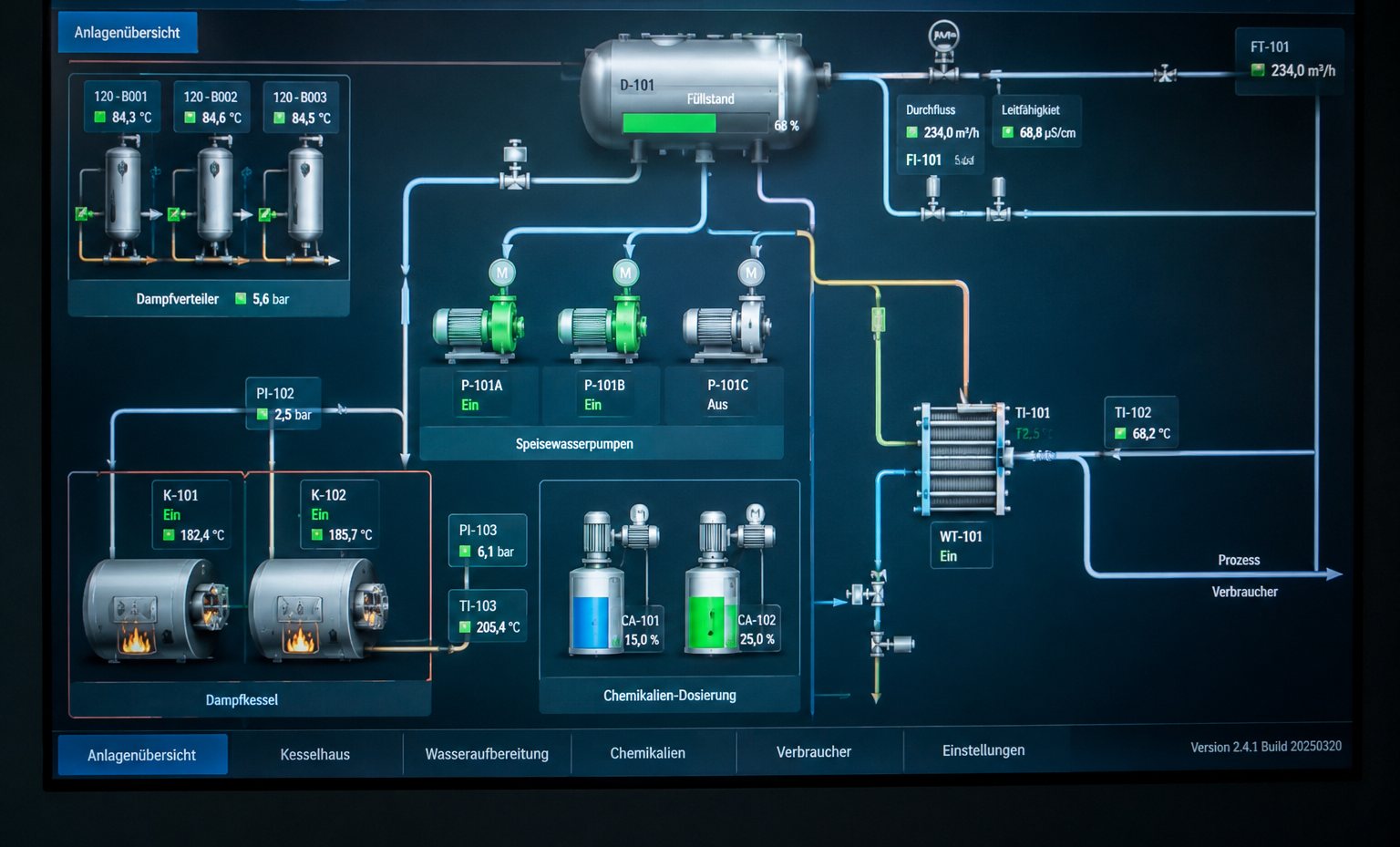
This is the starting point in many plants: an overview with units, states and live values – level 68 per cent, conductivity 68.8 µS/cm, pump C off.
All correct. And yet this picture answers none of the questions asked during configuration: who decides when a limit is exceeded? From when may start-up begin? Who approves, and how would you know?
Click to enlarge – below it the same plant as a process model.
Why this goes wrong so often
A plant view is quickly drawn and looks like progress. Modelling the workflows, by contrast, feels like effort without a visible result – so it gets postponed.
It comes back during configuration: who decides when a limit is exceeded? From when may start-up begin? Who approves, and how would you know? Those answers then have to be found mid-project.
What the model additionally carries
Every step carries role, system, limit, control, evidence and approval. Those entries are exactly what the MES requirements are derived from – with a rationale instead of from a template.
And during validation you can show which obligation led to which inspection step.
Prefer a window of its own? Open steam generation as a demo page · All models under BPMN-Demos.
Use case 1
Pharmaceutical manufacturing: introducing an MES under GxP obligations
Starting point
A manufacturer is introducing an MES. The processes exist – in standard procedures, in people’s heads and in a control matrix. The MES supplier asks for process steps, inspection points and approval rules; the answers sit in four different places.
Validation additionally requires evidence of why each inspection step is designed the way it is.
What TAOM contributes
The workflows are captured and modelled, and each step gets role, system, inspection point, obligation and approval attached directly. The MES requirements are derived from the model – with a rationale.
During validation you can show which obligation led to which inspection step.
- 01DiscoveryStructure batch release, weighing, in-process control and documentation out of the workshops.
- 02EnrichmentPer step: role, system, inspection instruction, evidence, four-eyes principle.
- 03RequirementsWhat the MES has to do – derived, not copied from a template.
- 04ScopeWhich check runs in the MES, which in the ERP, which in the lab.
- 05EvidenceCarried through from obligation to test case.
- 06AfterwardsThe model stays and carries the next change – it was never a project document.
Use case 2
Industrial manufacturing: sorting out MES, ERP and shopfloor
Starting point
A grown landscape: ERP for order and material, MES for scheduling and confirmation, plus scales, label printers and a handful of spreadsheets. Nobody can say which step runs in which system – and the errors happen at the transitions.
Ahead of an S/4HANA move the question becomes urgent.
What TAOM contributes
The workflow is modelled once end to end – from customer order to dispatch – and each step is assigned its system. It becomes visible where data is moved by hand and where two systems hold the same thing.
The transitions turn into requirements with a priority instead of a gut feeling.
- 01System assignmentPer step: ERP, MES, side application or manual work.
- 02Make the breaks visibleWhere data is retyped and where the same thing is held twice.
- 03Labelling and traceabilityWhen each label is created and what feeds it.
- 04Derive requirementsInterface, enhancement or process change – with a reason.
- 05Preparing the transformationThe model is the basis for fit-to-standard.
- 06After the moveThe to-be workflow is documented and can be checked.
To look at
Five industries, five models you can walk through
These workflows already have an interactive BPMN demo. They show the same principle as the two cases above – to click through instead of to read.
Food production
Wholesale coffee roastery – green coffee, roasting, batches, shelf life and warehouse connection in one continuous workflow.
Open demo →
Public administration
Traffic offences – from intake through review and hearing to the decision notice, with deadlines, approvals and correspondence.
Open demo →
Semiconductor manufacturing
Chip production from goods receipt to the cleanroom airlock – inspection points, blocked stock and strict handover rules.
Open demo →
Chemical industry
Producing liquids in tank production – batching, release, filling and the controls in between.
Open demo →
Laboratory and analytics
Water analysis from sample intake to test report – chain of custody, measurement, assessment and result approval.
Open demo →
Plant and energy engineering
Steam generation: starting up the boiler and releasing feedwater – exactly the workflow behind the plant overview above, with control room, lab and maintenance.
Open demo →
Your industry missing?
The demos are built from real process descriptions. Describe a workflow and a model can be built from it quickly.
Getting started
Your case is probably not exotic
If you have to sort out ERP, MES and side applications, or prove an obligation whose origin nobody remembers – then we know the pattern.