9,000 benefit.
Everyone improves.
Your company’s process knowledge does not belong to the modellers alone. With the TAOM Viewer, employees find their processes, manuals, tests and key figures – and report improvements directly to the people responsible.
My processes
Flow · Manual · Tests · Risks · Reports
order
material
production
At a glance
Report it right at the step.
Three effects you feel every day.
“With TAOM, the company’s process knowledge becomes usable for every authorised employee – and everyone can help improve the processes continuously.”
Process knowledge for everyone
Every authorised person finds their process, their role and the valid version – without an editor licence.
Manuals right on the process
Guides with screenshots from the passed test run – right at the step in question.
Improvements from the business
Anyone who notices an error or a gap reports it at the step – the process owner sees it immediately.
9,000 employees become 9,000 potential sources of ideas.
The Viewer is not a one-way street. The business spots deviations first – and can report them where they arise.
How an improvement runs through TAOM ↓
Use the process
Employees open their favourites.
Report a problem
A ticket right on the model or process step.
GPO handles it
The feedback reaches those responsible in the editor.
Assess the change
A reported variant becomes a draft; Change Impact assesses tests, risks and approvals.
Business → Viewer → GPO → Process Studio → Change Impact → improved process
The editor remains the place for modelling and governance. The Viewer brings the results into the organisation – and turns feedback from practice into the starting point for targeted improvements.
From report to new version – in six steps.
Example: a check step is missing in production. Click through or let it play.
One company. Two perspectives.
One shared process knowledge.
A few experts model and steer the processes. Thousands of employees have to understand and apply them every day. The Viewer connects both worlds – without everyone needing an editor.
editor users
Model, structure, approve and maintain processes centrally.
viewer users
Find the processes and documentation relevant to their work – according to their permissions.
Improvements from the business
Suggestions reach the responsible GPOs, linked to the model and step.
Illustrative company example; user numbers and licence scope are customer-specific.
One process, everything included.
This is how employees see a process in the Process Studio Viewer: from the enterprise model at the top to the guide with screenshots at the bottom – on one page.
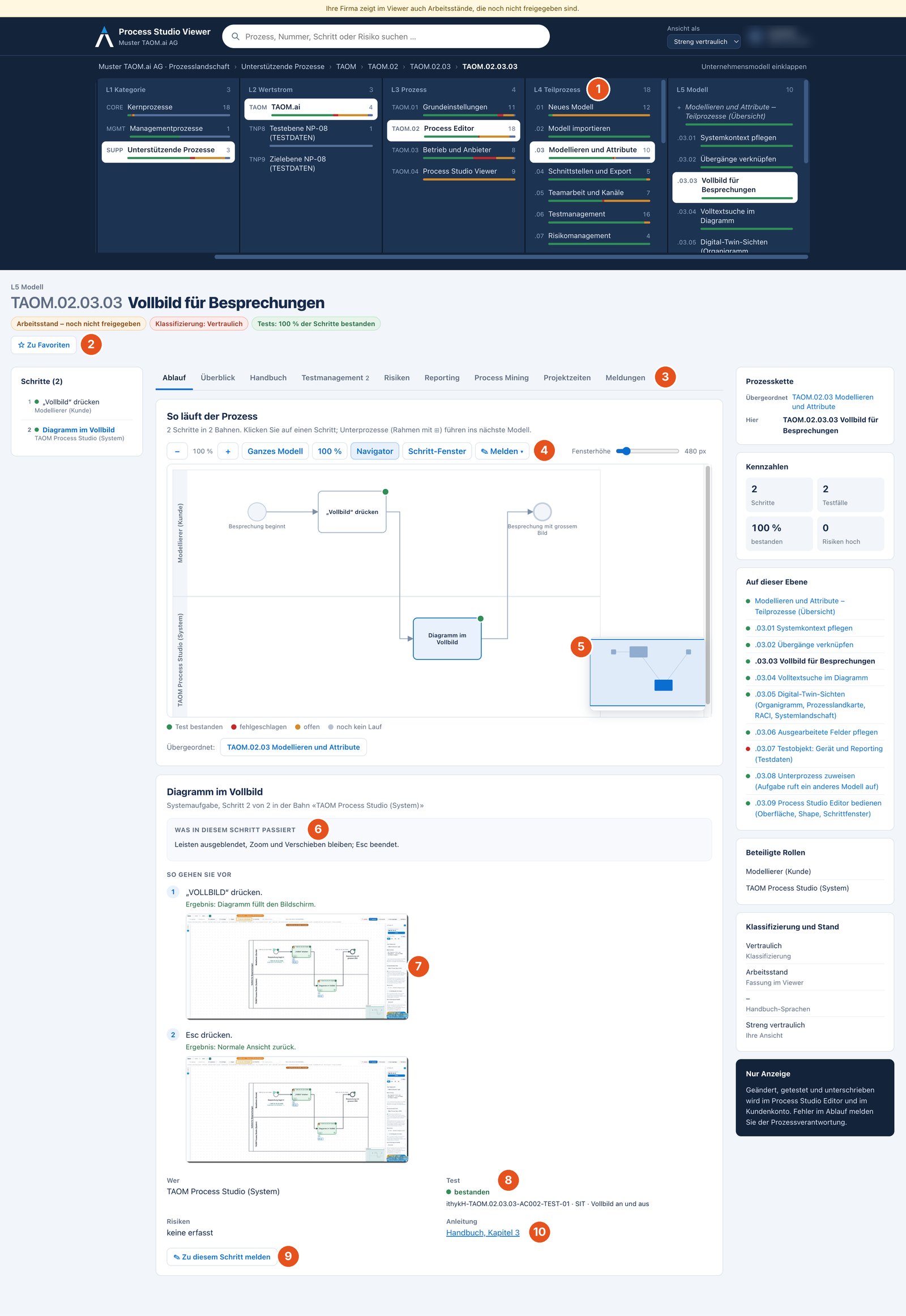
- 1Enterprise model From the landscape down to the single model – in columns, with test status as a bar.
- 2Favourites Add any level to “My favourites” with one click – the personal start page.
- 3Tabs Flow, overview, manual, test management, risks, reporting, process mining, project times, reports.
- 4Report An improvement for the whole model or the selected step – right from the flow.
- 5Navigator For large models the overview shows where you are; zoom and window height are adjustable.
- 6What happens here The description of each step, as worked out in the editor.
- 7How to proceed Work steps with screenshots from the passed test run – view only, no download.
- 8Test status Whether the step has been tested and passed – with the test case ID.
- 9Report on this step Something missing or done differently? This is where improvement starts.
- 10Manual The way into the matching chapter of the user manual.
Everything employees need.
On the right process.
No searching through scattered files and portals: process knowledge becomes usable in the context of the actual work.
Walk through the process landscape
Navigate from company level down to the single process step – including sub-models and additional models. More →
My personal entry point
Save relevant processes as favourites. A production employee starts right at their P2M flows. More →
Manuals & guides
Call up documentation in the context of the process instead of searching for it in folder structures. More →
Understand tests & risks
View related test cases, test status and risks in the process context – depending on permissions. More →
Key figures & transparency
View available information from reporting, process mining and project times directly on the model. More →
Report an improvement on the step
Pass errors, questions and suggestions to the model owners with a clear link to the process. More →
Report an improvement – in four steps.
Anyone who notices in daily work that something is wrong reports it where it happens. No e-mail, no searching for the person responsible.
Choose “✎ Report”
In the flow: On the model or On the selected step. Or directly below a step: “Report on this step”.
Give the type
Error, something missing, a missing process variant or a question – with a short title, description and suggestion.
Missing steps
For a variant you set after which step it branches off and enter the missing steps with role and result.
Follow the status
The process owner sees the report in the editor under “Tickets”, replies and adopts a variant as a draft. You see the status under “Reports”.
Viewer for the many. Editor for steering.
See. Understand. Report.
Search processes, use favourites, view documentation and tests, submit improvements.
Model. Review. Approve.
Steer BPMN, requirements, test management, roles, digital signatures and information protection.
Measure. Assess. Improve.
Reporting, process mining and project times and Change Impact Management brought together.
100 in the editor. 9,000 in the Viewer.
An industrial company with around 9,000 employees: whoever designs, reviews or steers processes works in the editor – everyone else reads in the Viewer.
Process modelling
GPOs and process experts model with AI agents, maintain information protection and approve versions.
Project management
Project managers and the PMO plan project times per step and steer organisation, tasks and changes.
Test management
Testers and key users run test cases, record evidence with screenshots and generate manuals.
All employees
Read flows, manuals and test cases of their areas, pick favourites and report improvements – without an editor licence.
Illustrative example; each company sets the number and licence tiers itself. Licences per named person, term of your choice.
Who sees what – as in the editor.
The roles come from the project organisation you already maintain in the editor. Anyone working in test management there sees test cases and risks in the Viewer; key users see flows, manuals and test cases for reference.
Broad roles for everyone – personal exceptions where needed.
Your administrator sets what each role sees in the customer account. Role and areas can be adjusted for individual people. The classification – public, internal, confidential, strictly confidential – applies in the Viewer just as in the editor. Manuals and screenshots are only displayed, not downloaded.
Process knowledge for everyone.
Improvements from the whole organisation.
Don’t just show your employees what processes look like – give them a direct way to make them better.