TAOM™ Integrations
Keep your tools. Connect your information.
Transformation does not happen in a single application. Processes live in process platforms, requirements in delivery systems, knowledge in collaboration tools, and execution in ERP. TAOM connects these perspectives instead of creating another silo.
The starting point
Software is rarely the problem
Most organizations already have powerful platforms. The problem is that information is distributed across them – while no one owns the context between them.
Why this matters
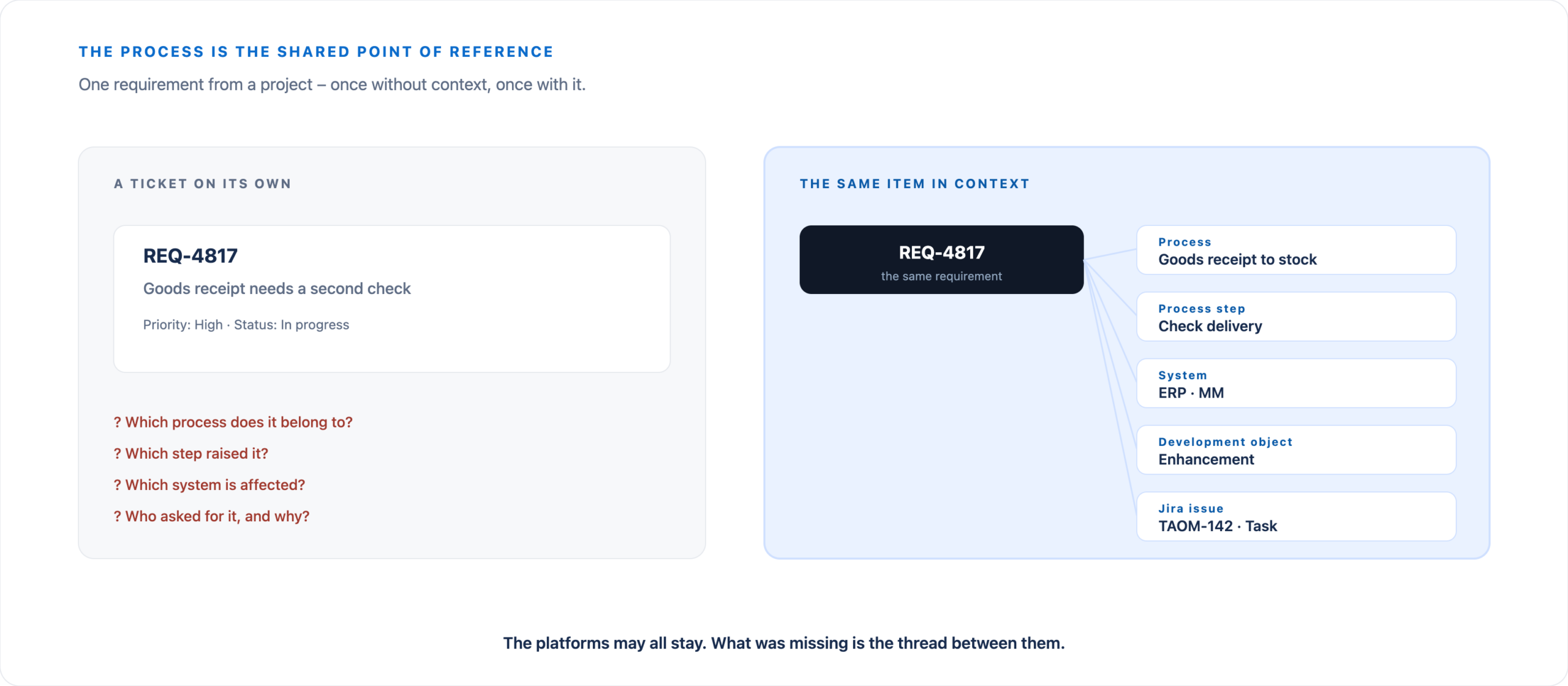
The process is the common point of reference
One requirement from a transformation initiative – once without context and once with context.
What the result looks like
An issue and a page, generated from the model
Not a marketing screenshot but a template with demo content – it is about the layout and about which field comes from where.
The Jira issue carries the TAOM identifier as a stable key, plus epic link, component, WRICEF labels and the child issues. The Confluence page is built as a readable document: prose at its core, figures and status compact in the page details on the right. The mapping of process to epic, phase to story and step to task holds both together.
View the template → · Read the article →
Template with demo content – it defines how the result is structured. Jira and Confluence are Atlassian products, SAP is a trademark of SAP SE.
Maturity
Integration grows over time – and we state clearly where we are
Nobody needs full automation on day one. Five levels, with a transparent status for each.
Five stages – and where TAOM stands today
Which side owns which value is defined field by field.
Integration Areas
What works today – and what does not
Delivery Platforms · Jira
The process element contains the information required for delivery:
- Issue Type
- Priority and Status
- Component and Version
- Responsibility
- Requirement
- Development Object (WRICEF)
- Process Context
The forms use the official, unmodified Jira icons and status colors. The base URL of the customer’s own Jira instance is configured in the settings – only then do the links point to the correct destination.
What works: The model produces an epic, stories per phase and issues per step. After human approval the flow writes the key and the link back and reconciles on every further run instead of creating duplicates. Return path – available today: If someone changes the status in Jira, our own Atlassian app reports it back to the model. Which side owns which value is defined field by field – what the model owns cannot be overwritten from outside.
From Enterprise onwards. This applies to both directions, outbound and return. An actual connection to Jira requires a dedicated environment and the customer’s own Atlassian licences. It is not part of the Demo, Webuser or Webuser Pro levels and is set out in the Enterprise contract.
Knowledge Platforms · Confluence
Process Steps can be linked to their associated documentation – Work Instructions, Functional and Technical Specifications, Decisions, Meeting Outcomes, and Policies.
What works: A model produces a page tree of process pages and specifications, each carrying identifier, level, status and references – reconciled on every run. Return path – available today: If a text section is changed in Confluence, our own Atlassian app reports it back to the model, within the fields that Confluence owns.
From Enterprise onwards. As with Jira, for both directions: dedicated environment, the customer’s own Atlassian licences, settled in the Enterprise contract.
Microsoft 365 · SharePoint and OneDrive
This is currently the most advanced integration: using Microsoft Graph, TAOM recursively reads a configured folder, retrieves every .bpmnor .xmlfile, and creates one Workspace per file. Credentials remain server-side, and all calls are routed through the server.
Direction: currently into TAOM, not back to the source system.
ERP · SAP and others
Process Steps carry Application Context: which application supports the step, which ERP Component is involved, and which functions are relevant.
Behind this is a dedicated Reference Repository with more than 2,400 evidence-based mappings from Process Step to Component and Function. Every entry includes its source – the repository is searched, not invented.
What is not yet available: direct technical access to live ERP systems.
Process Platforms · SAP Signavio and others
BPMN 2.0 enables model exchange in both directions. Existing repositories therefore do not need to be replaced – TAOM can operate alongside them as an enrichment and transformation layer.
Foundation: file exchange, not a live tool-to-tool integration.
Architecture, Automation, and AI Platforms
Structured context is the prerequisite for connecting Capabilities, Applications, and Requirements with Enterprise Architecture, triggering workflows, or supplying Agents on external platforms with enterprise context.
The interfaces are in place. The integration itself is defined per customer – direction, scope and reconciliation behaviour depend on the target platform and the undertaking.
Scope
Integration does not mean replacement
TAOM does not replace these systems. It manages the relationships between the information that lives within them.
That is the difference between another tool and a Context Layer.
The goal
Every object should know what it belongs to
When these relationships remain intact, transformation becomes traceable and governable – that is the purpose of the entire integration approach.
API and extensibility
Not just connectable. Addressable too.
Enterprise context is not only valuable inside TAOM. Through a programming interface, your own applications, integration services and automations can reach processes, details and functions – without anyone having to work in Process Studio for it.
Workspaces and models
Create, read, change, retrieve versions. Plus phases, metadata, groups of several diagrams and the provenance seal.
Enrichment
Start a run, query its state, fetch the result – for a single element as well as for the whole model.
Attachments
Upload, list, retrieve and remove documents – bound to the element they belong to.
Agents
Catalogue of agents, style profile, library, plus request and result of a run.
Users and licence
Sign-in, account, licence status – the basis for an external application acting on behalf of an authorised user.
Presence
Who is currently working on a model. Collaborative work can thus be reflected outside the interface too.
The interface sits under the namespace taom/v1 and is versioned – a new version does not silently replace the old one.
The difference
Interface, connector, integration – three different things
We do not call everything an integration. The three terms mark three levels of maturity, and only the third means something actually runs in production.
Interface
TAOM provides functions and details technically. What is built from them is decided by the other side.
Connector
A prepared connection for a particular system – Jira, Confluence or a process platform, for instance.
Integration
A concrete connection with defined direction, scope and behaviour on synchronisation. Only here does the maturity level above apply.
For development and enterprise IT
Not just exchanging data – preserving the connection
TAOM does not have to become the centre of your landscape. What matters is that a transfer keeps the assignment intact: a requirement stays with its process, a development object with its requirement, a system with the steps it carries.
View the Digital Twin → · Tooling in the framework → · Discuss interfaces →
Getting started
Start with the system causing the most friction
Do not integrate everything at once. Start with the system that makes the biggest difference in your initiative, connect that first, and add the rest step by step.