Produkt
Business knowledge becomes a connected enterprise model.
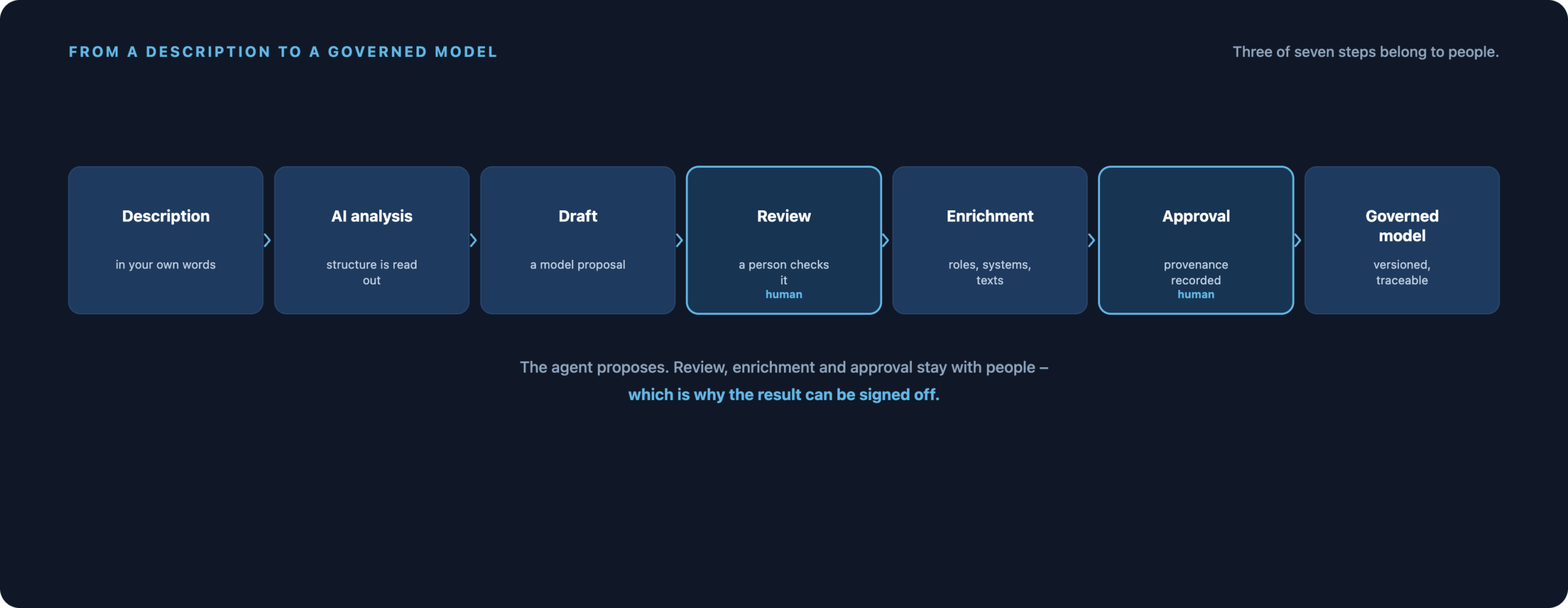
Describe how your organisation works in your own words, upload an existing model, or start straight on the canvas. Process Studio and the TAOM agents turn that into processes, roles, systems, requirements, development objects and documentation – accountability stays with you.
- Describe
- Generate
- Model
- Enrich
- Connect
- Govern
- Collaborate
And because they sit on the element, they can be queried
These details are not in a document beside the model – they are on the process step itself, searchable across every model in the company. Where is this role used? Which steps must be verified but have no test case? Thirteen ready-made questions answer that without opening a single file.
More than a drawing tool
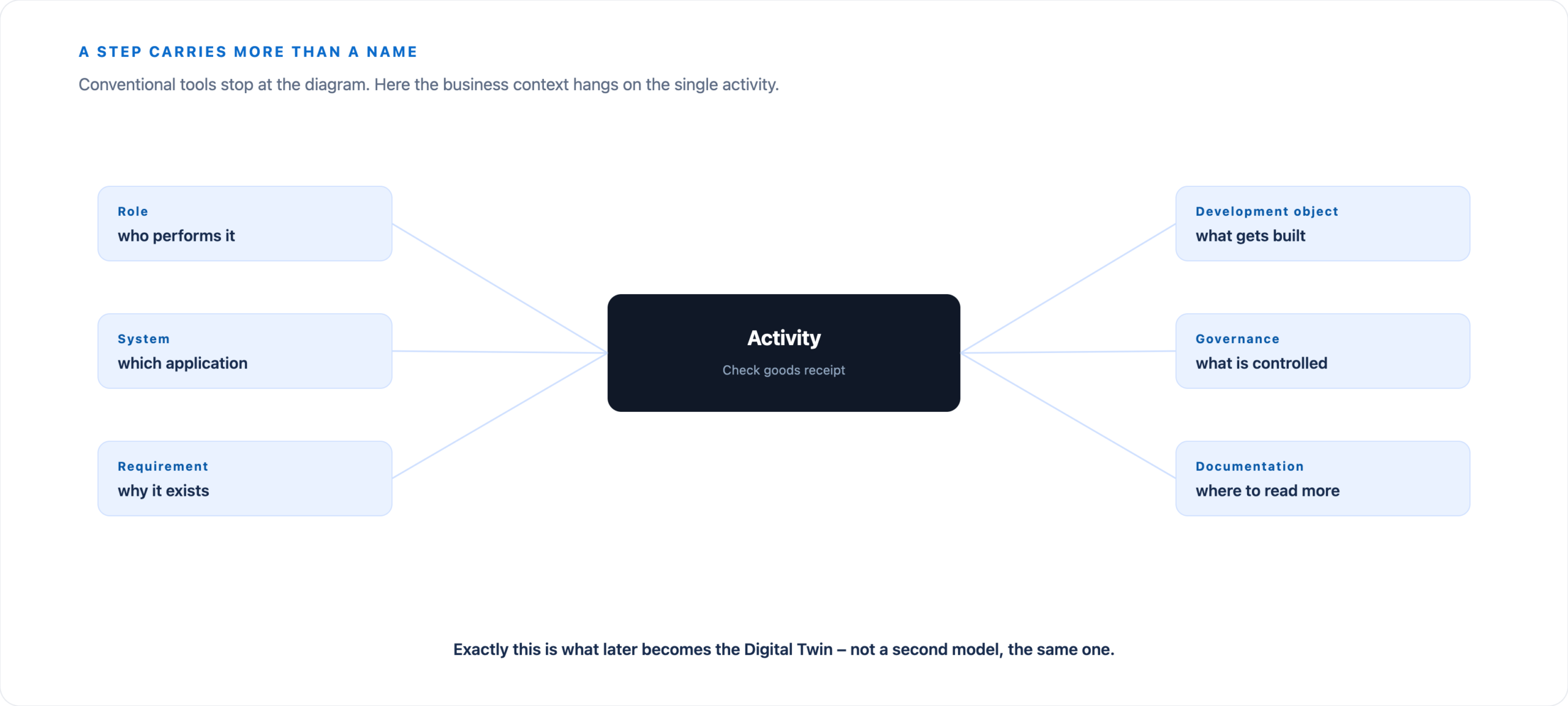
A step carries more than a name
Conventional tools stop at the diagram. In TAOM, a single activity carries its business context – and that is exactly what later becomes the Digital Twin.
Process Studio
Model the organisation, not just the process
The editor has long done more than BPMN. Alongside the process diagram it produces org charts, process maps, system landscapes and RACI matrices – on the same canvas, with the same information on the elements.
- BPMN 2.0
- Process hierarchies L0–L4
- Process map
- Organisation model
- System landscape
- RACI matrix
- Roles and systems
- WRICEF objects
- Phases
- Business descriptions
The source stays untouched
The uploaded file sits on the left, for viewing only. You can compare it with the working version at any time.
This is where the work happens
The editable version grows on the right: model, enrich, govern. The difference between starting point and result stays visible.
AI agents
Describe the process. The structure comes from the agent.
Nobody should have to learn BPMN before explaining how their own organisation works. The agent takes running text, workshop notes, work instructions, requirements – or spoken language.
Provenance and quality seal
You can tell where a model came from
AI-generated enterprise information needs evidence. TAOM writes the provenance into the file, signed – and does not hide the involvement of AI but names it.
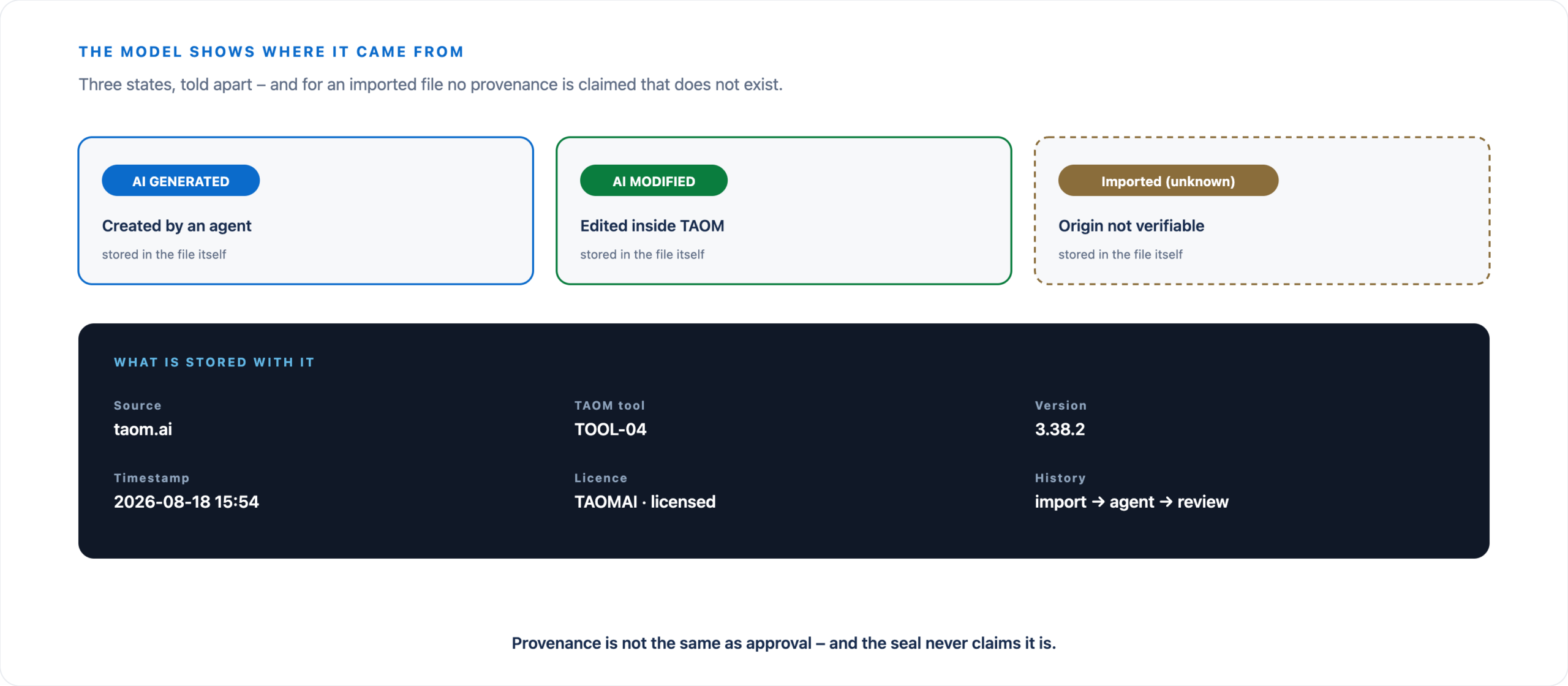
For an imported third-party file, no provenance is claimed that does not exist: the history starts honestly with “Imported (unknown)”, and only what actually happens in TAOM is added.
Beyond BPMN
Business meaning on the element itself
Depending on element and context, this information can be recorded – and it stays where it was created.
- Business description
- TAOM identifier
- Role
- System
- Process phase
- Classification
- WRICEF category
- Requirement link
- Priority
- Status
- Issue type
- Jira fields
- Confluence link
- Governance
From process to delivery
The biggest break in transformation work sits between analysis and delivery: models here, requirements there, development in the project tool, documentation somewhere else. TAOM holds the chain together – process step, requirement, development object, priority and status, documentation.
The process stays the point of reference.
One model, several outputs
- BPMNKeep working in a structured way, in other tools too.
- HTMLPublish a version people can walk through.
- PDFA process document to hand on.
- Digital TwinThe process as part of the connected context.
Connections
Connectable without replacing anything
TAOM does not take the place of existing platforms. It supplies the structured context they can dock onto.
Jira
Issue type, priority, status, component, version and assignee sit on the element. The shapes use the official, unmodified Jira icons and status colours.
Confluence
Steps can be linked to the matching documentation. The base address of your own instance is set in the configuration.
ERP and enterprise systems
Processes carry the application and system context that transformation and delivery need – such as ERP component and functions.
Jira and Confluence are Atlassian products and denote independent systems – they are not merged with TAOM.
A process rarely belongs to one person
Subject-matter experts, process owners, consultants, architects and delivery teams bring different views. Process Studio provides shared workspaces for that: history, visible changes, descriptions per element, current state of the model.
Changes become visible instead of disappearing into file versions.
The editor stands on its own
You do not have to use the AI. Upload existing BPMN, create an empty diagram, place and connect elements, arrange lanes and phases, maintain descriptions and attributes, export – all of it works without a single agent run.
AI joins in where it actually helps.
At your own pace
From the first diagram to enterprise scale
Getting started
Start with what you already have
You do not need a perfect process model. A BPMN file, a workshop record, a work instruction, a requirement – or simply explain the workflow in your own words.
Both directions – where we stand
Process → Jira and Confluence is in production: epic, stories per phase, issues per step, a page tree with specifications – generated from the model and reconciled on every run.
The way back is built and going live now: if someone changes a status in Jira or a passage in Confluence, an Atlassian app reports it back to the model. Which field belongs to whom is defined field by field – not everything may be overwritten from outside.