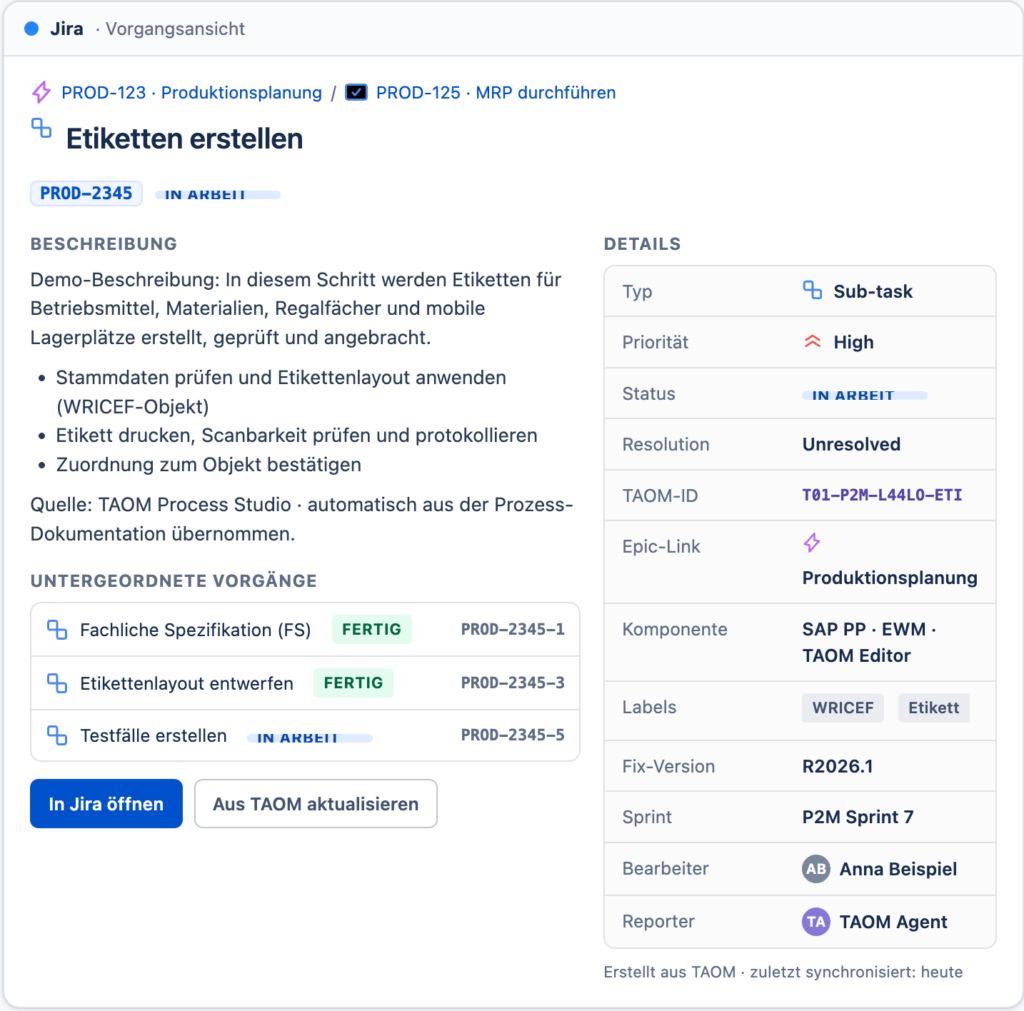
TAOM → Jira & Confluence · layout template
This is how a Jira issue and the automatically generated Confluence blueprint page can look, built from the TAOM structure. Every field is fed from TAOM attributes (object/TAOM ID as the stable key, process = epic, phase = story, step = task/sub-task). Demo content – this is about the layout.
Create labels
Demo description: in this step, labels for equipment, materials, shelf compartments and mobile storage bins are created, checked and attached.
- Check master data and apply the label layout (WRICEF object)
- Print the label, verify scannability and record it
- Confirm the assignment to the object
Source: TAOM Process Studio · taken automatically from the process documentation.
- 1 · Process overview
- 2 · Production planning (L4)
- 2.1 Run MRP
- 2.2 Plan the production order
- 2.3 Capacity levelling
- 3 · WRICEF
- 4 · Risks & measures
- 5 · Test management
- 6 · Change history
Production planning Approved
This scope item covers production planning – from requirements planning (MRP) through production order planning to capacity levelling. It makes planning-relevant objects, materials and resources unambiguously documented, traceable and linked to the executing SAP systems.
Elaboration
The process plans secondary demand on time and in the right quantity and turns it into executable production orders. It covers checking material availability, levelling available capacity and releasing the orders to production. Read more …
Position in the process (BPMN)
🔗 Show in BPMNLinked model in gBPML, maintained in the TAOM Editor / TAOM Process Studio. open · from gBPML (column AE) — the model link is added automatically at the next sync.
| Scope item | Title | Relation | Status |
|---|---|---|---|
| J45 | Material requirements planning | required | Active |
| BJ8 | Production order processing | downstream | Active |
| 3JP | Warehouse management (EWM) | required | Being introduced |
| Assumption / KDD | Comment | Link |
|---|---|---|
| One label template group-wide | Global template decision DEC-010 | DEC-010 |
| MRP runs nightly in batch | open · from gBPML | — |
open · from gBPML role → SAP transaction per scope item is not fully mapped yet.
| Role | Role description | Tasks / transactions | Access type |
|---|---|---|---|
| a production planner | Plans demand and production orders | MD01 · CO40 · MD04 | Create/change |
| a warehouse operative | Labelling & bin maintenance | /SCWM/LS01 · MB1A | Execute |
6.1 Master data
- Material · routing · bill of material
- Work centre / resource
- Storage bin & label layout
- open · BP available (H)
6.2 Organisational structure
- Plant · storage location · production version
- MRP controller group
- EWM warehouse number
Scope availability per country (source: BP available):
| Value category | Value lever | Measure | Target |
|---|---|---|---|
| Efficiency | Fewer mislabelled objects | Label error rate | < 0,5 % |
| Lead time | Faster order release | Avg. time MRP → release | open · from gBPML |
| TAOM-ID | Step | Type | Status | Jira |
|---|---|---|---|---|
| T01-P2M-L44LO-ETI | Create labels | Sub-task | In progress | PROD-2345 |
| T01-P2M-L44LO-PLA | Create planned order | Task | Open | PROD-2346 |
| T01-P2M-L44LO-MRP | Run MRP | Task | Done | PROD-2340 |
As a warehouse operative I want labels to be filled automatically from the material master data so that I do not have to enter data twice.
As a production planner I want to reprint labels with a documented reason so that changes stay auditable.
As a quality manager I want a multi-stage approval process for safety-relevant labels so that regulatory requirements (ISO 9001) are met.
| Type | Title | Description | Status | Jira |
|---|---|---|---|---|
| F – Form | Label template | Label layout & print mask | Done | PROD-3001 |
| R – Report | Label log | Record of printing & checking | In progress | PROD-3002 |
| I – Interface | Label printing service | Interface to the printing system | In progress | PROD-3003 |
| E – Enhancement | Reprint with a reason | Extension for the reprint process | Open | PROD-3005 |
Updated: 2026-08-01 · AUD-1784486253473 · Refs: OS-15, TOOL-12
Leave a Reply