Most support requests don’t fail because of the solution but because of the description. “It doesn’t work” without a picture, without a location and without a version costs time on both sides.
One window for all requests
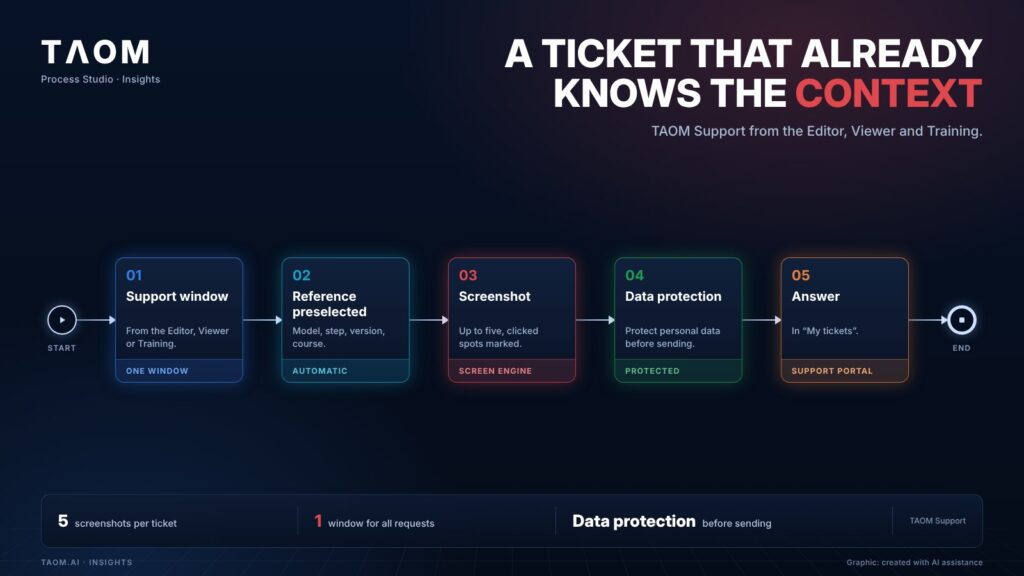
In TAOM, you open the support window where you are working – in the Editor, the Viewer or Training. The area is preselected based on where you come from, and the reference is passed on: model, step and version, or the course in Training. You choose category, priority and a callback request in the same window.
A picture shows where it is stuck
With the Screen Engine, you take up to five screenshots – immediately or with a timer, so that you can open a menu first. The places you last clicked are marked; you add a frame, arrow or text.
Data protection belongs in the ticket
Personal details in the image can be made unrecognisable before sending. If you send the model content along and the model is confidential, TAOM asks first. If your company’s automated data protection is active, names, logins and contact details are replaced by placeholders – structure and identifiers remain so that support can help.
What happens next
The answer appears in “My tickets” and in the support portal. How quickly we respond depends on the support level: Basic, Standard, Business or Enterprise. What each level provides is set out in the support terms. And because a ticket arrives with context, the answer starts with the solution instead of a follow-up question.
In short
A good ticket is created where the problem occurs: with reference, picture and the spot marked – and with data protection before anything leaves the company.
About TAOM: TAOM is the method and platform of Traniva AG (Switzerland) for people, processes and AI working together – with Process Studio Editor and Viewer, TAOM Training and Support. Our principle: AI supports, responsibility stays with people.
Read more: Support portal · Support terms (SLA) · Automated data protection · Learning video: Create a support ticket and read the answer
Leave a Reply