Data protection · Information protection
Automated data protection
Information protection is in our DNA. Mail addresses, names and identifiers appear in your evidence, manuals, exports and transfers only the way you define – detected automatically, confirmed by people.
Our DNA
Six statements we can be measured by
Your data belongs to you.
Not to the tool and not to the operator.
Data protection by default.
Protected is the normal case, not the exception.
You decide what leaves the house.
Per document, per channel, per target system.
Automation helps – a person is accountable.
Human in the loop, explicitly confirmed.
Originals remain untouched.
Access only with permission, every retrieval logged.
Proven, not promised.
Every change logged, every confirmation sealed.
Privacy by Design
Across the entire process lifecycle
Three layers of protection work together – from the first screenshot to the document that leaves your organisation.
Protection at the source
Personal and confidential information is detected and protected as soon as it is processed – in screen captures, uploaded images and texts on the process step.
Protection before AI
Customer-specific filter rules determine what goes to an external AI model. Names, addresses and your own blocked terms are replaced before sending – the answer comes back with the correct names.
Protection at export
Documents, screenshots and test evidence are checked before output and cleaned where necessary – in the PDF, the manual, the export, the mail and the transfer to target systems.
In 45 seconds
This is how the TAOM Data Protection Screen Engine looks
How it works
Four steps, one principle
1 · Configure
What is made unrecognisable – mail addresses, names, user names and identifiers, phone numbers, company names – and where it applies. Activate once; you receive a sealed confirmation.
2 · Detect
TAOM suggests the affected spots – in texts and in screenshots.
3 · Review
An authorised person reviews, completes and finalises. Before finalising, a second check reports anything missed.
4 · Output
Evidence, manuals, exports and transfers contain only the reviewed, unrecognisable version. Existing documents are re-checked and findings reported.
Where it applies
Wherever something leaves your organisation
Documents
- Test evidence (PDF)signed versions too – never changed afterwards
- User manual (Word and PDF)
- HTML export of models
View and mails
- Images on steps and modelsunrecognisable until reviewed by a person
- Mails sent by TAOM
Interfaces
- Target systems (e.g. Jira, Confluence)a separate rule per target system
- Collaboration channels (e.g. Teams, Slack)
- AI agentprompt to the language model
For each target system you define separately what is transferred unrecognisably – names of project members are often needed there for responsibilities. Addresses of our own team always appear unrecognisably in your documents.
Without external AI
The data protection check itself needs no AI
Detection, replacement and masking run entirely within TAOM – without an AI model, without an external service, without third parties. Your images and texts do not leave the TAOM environment for the check.
What this means for you
- No transfer to an AI service for the regular data protection check
- Defined, traceable and repeatable checking rules
- Detection you extend with your own terms
- Independent of external AI models for this step
For pharma, banks, insurers and public authorities in particular, the question is whether sensitive content has to be transferred to an AI service at all. Here the answer is: no.
And if you use the AI agent
Then TAOM protects before the prompt – not only at the later output:
The language model sees «[Person 1]» instead of a name, the same in every request – so responsibilities stay correct. The answer shows you the real names again.
Your block list – your own terms
Each company maintains its own list of protected terms. It applies to the AI agent, documents, exports, mails, images and – at your choice – target systems. For example:
- Project code names and confidential initiatives
- Customer and supplier names
- Product and active-ingredient names in development
- Names of internal systems and clients
- Locations and organisational units
- Terms from ongoing negotiations
From test operation
Demo screenshots
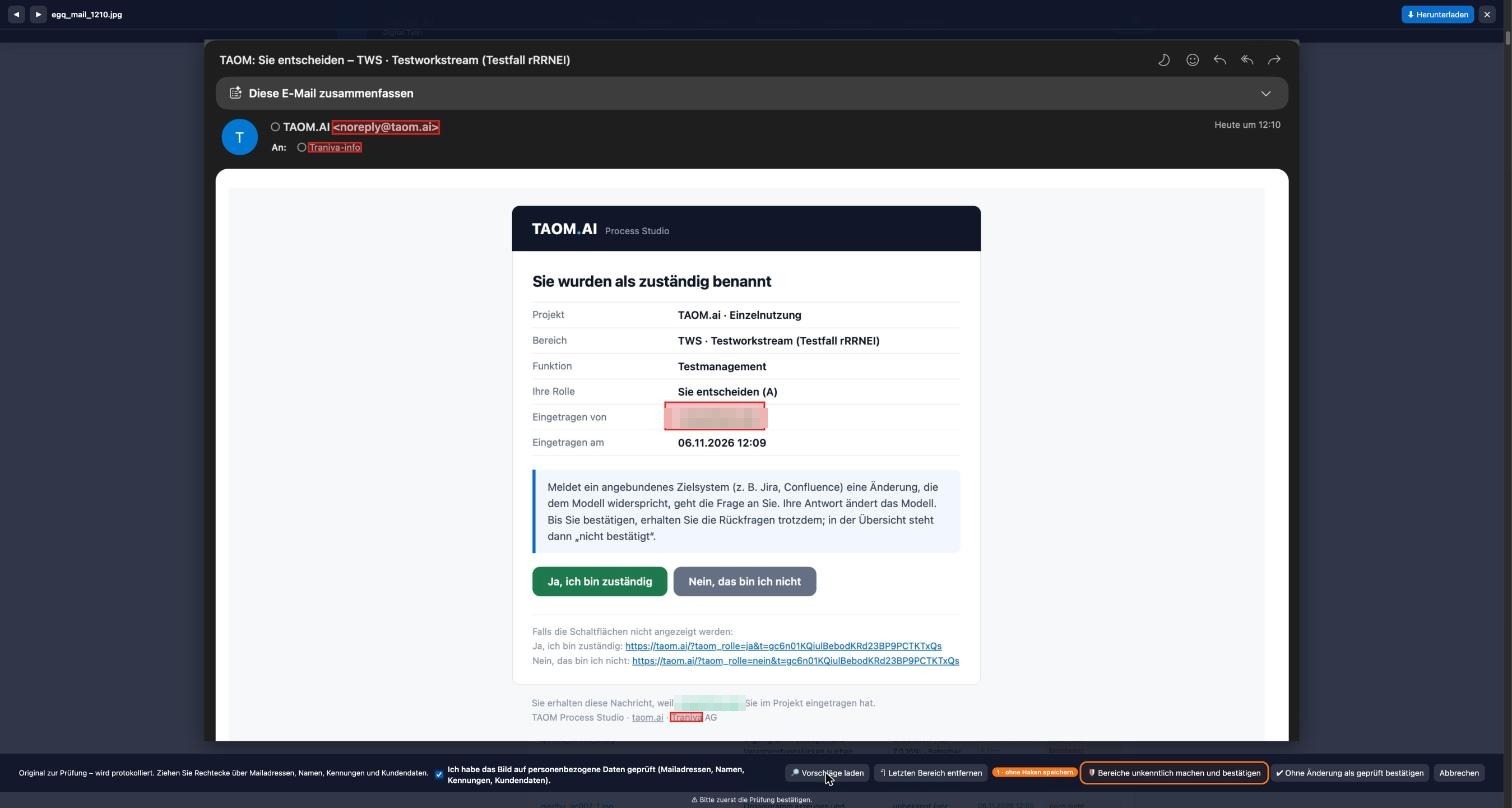
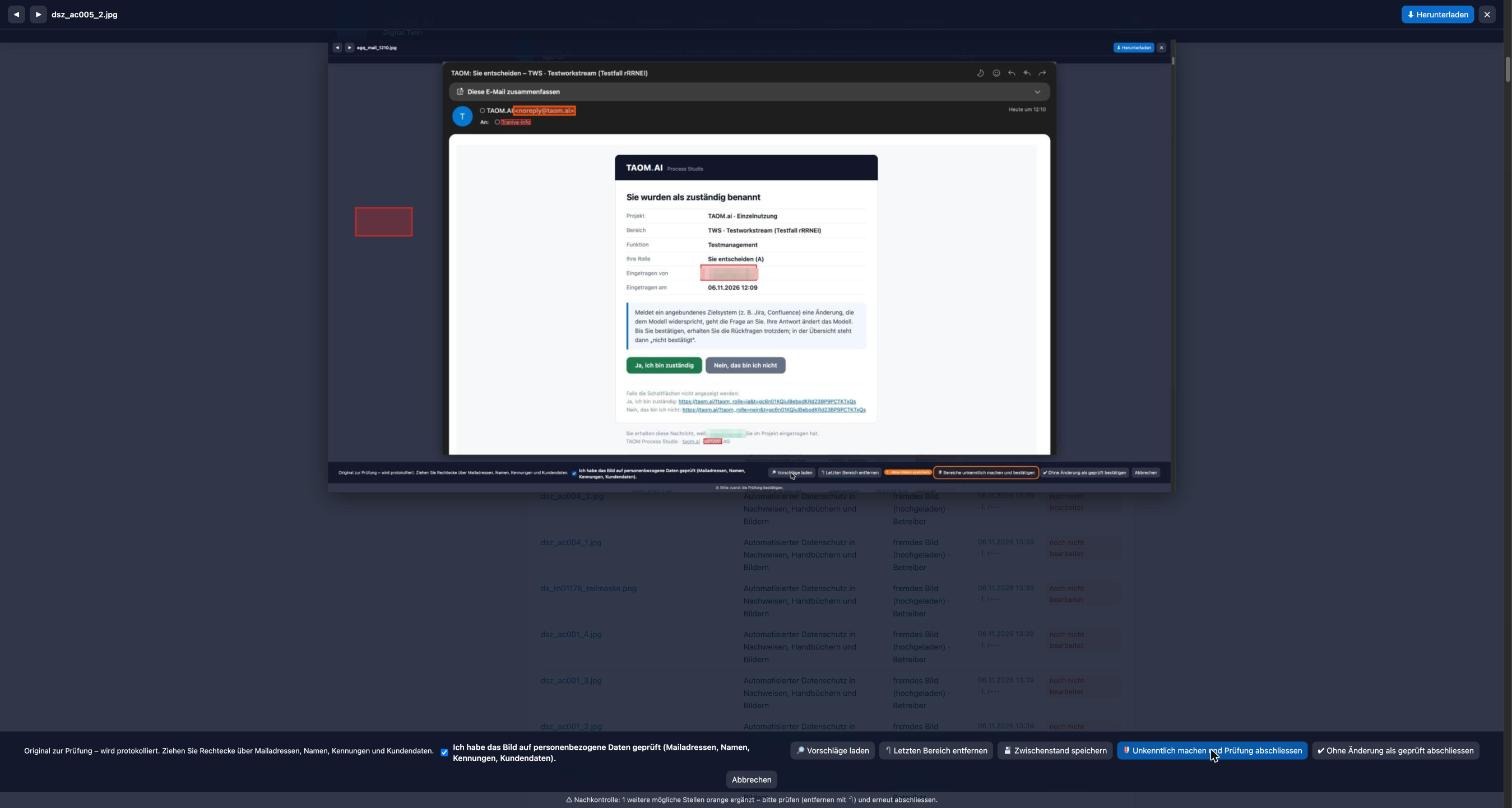
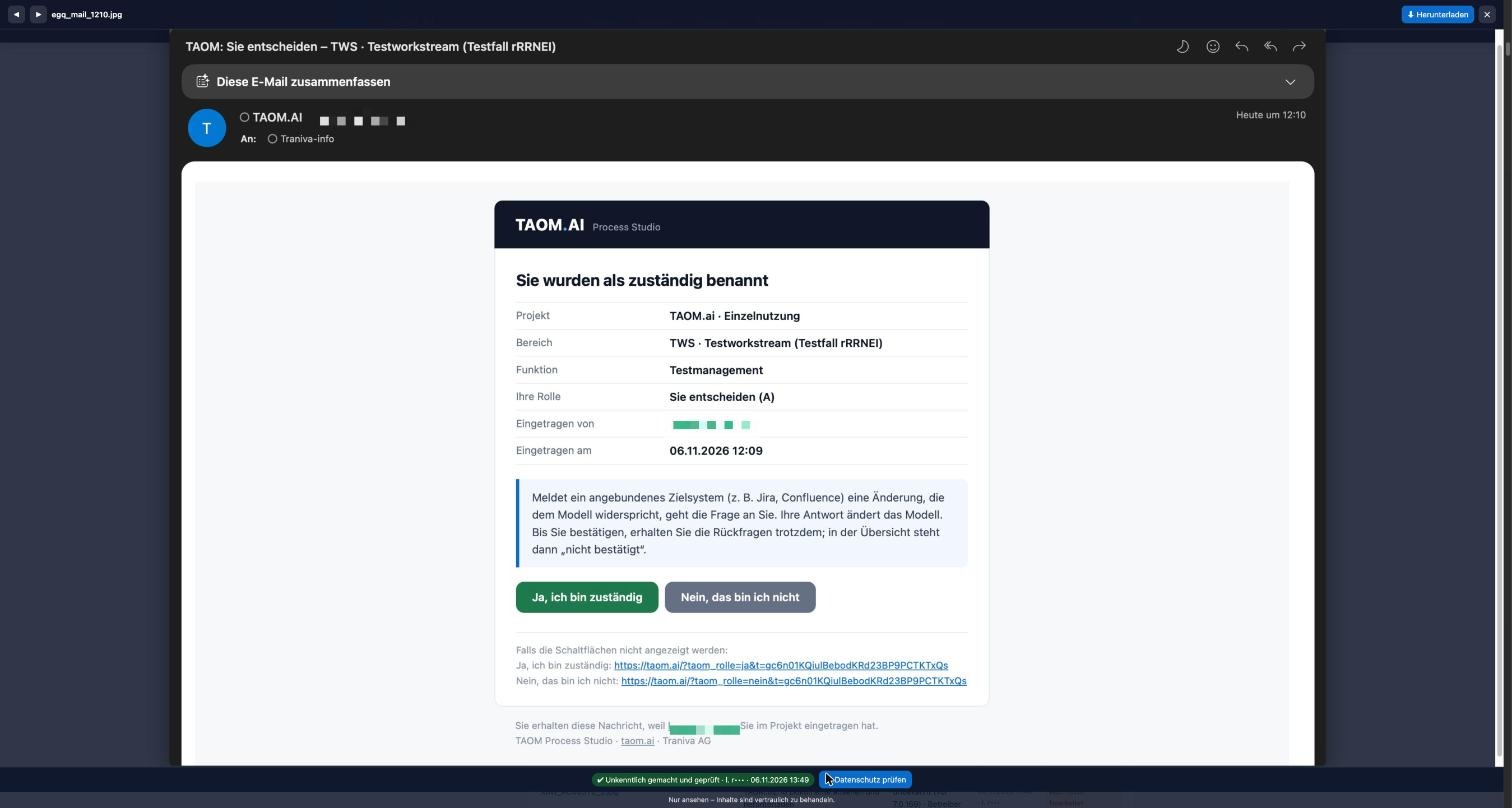
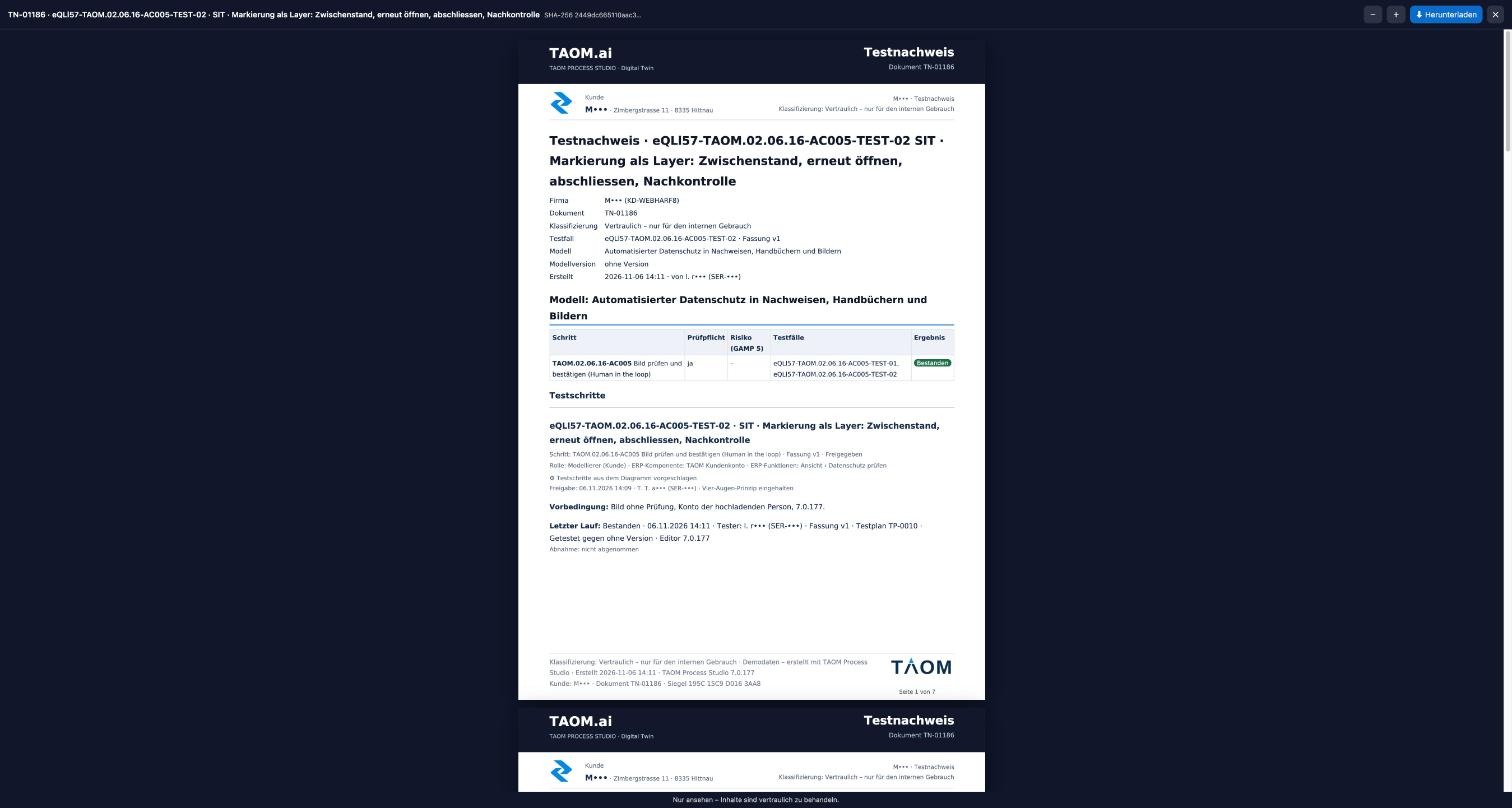
TAOM Screen Engine
Mark photos during the test run – with data protection right on the photo
Screenshots are captured and marked directly in the test run: click point, sequential numbers, frame, line, arrow, double arrow and field – in several colours, line widths and dashed. Every marking can be selected again, moved and removed. TAOM suggests personal data right on the photo; the tester marks further spots and confirms the review. The original stays unchanged, only the obscured version is output.
TAOM Data Protection Screen Engine
Not everything by hand – but nothing without a human in the loop
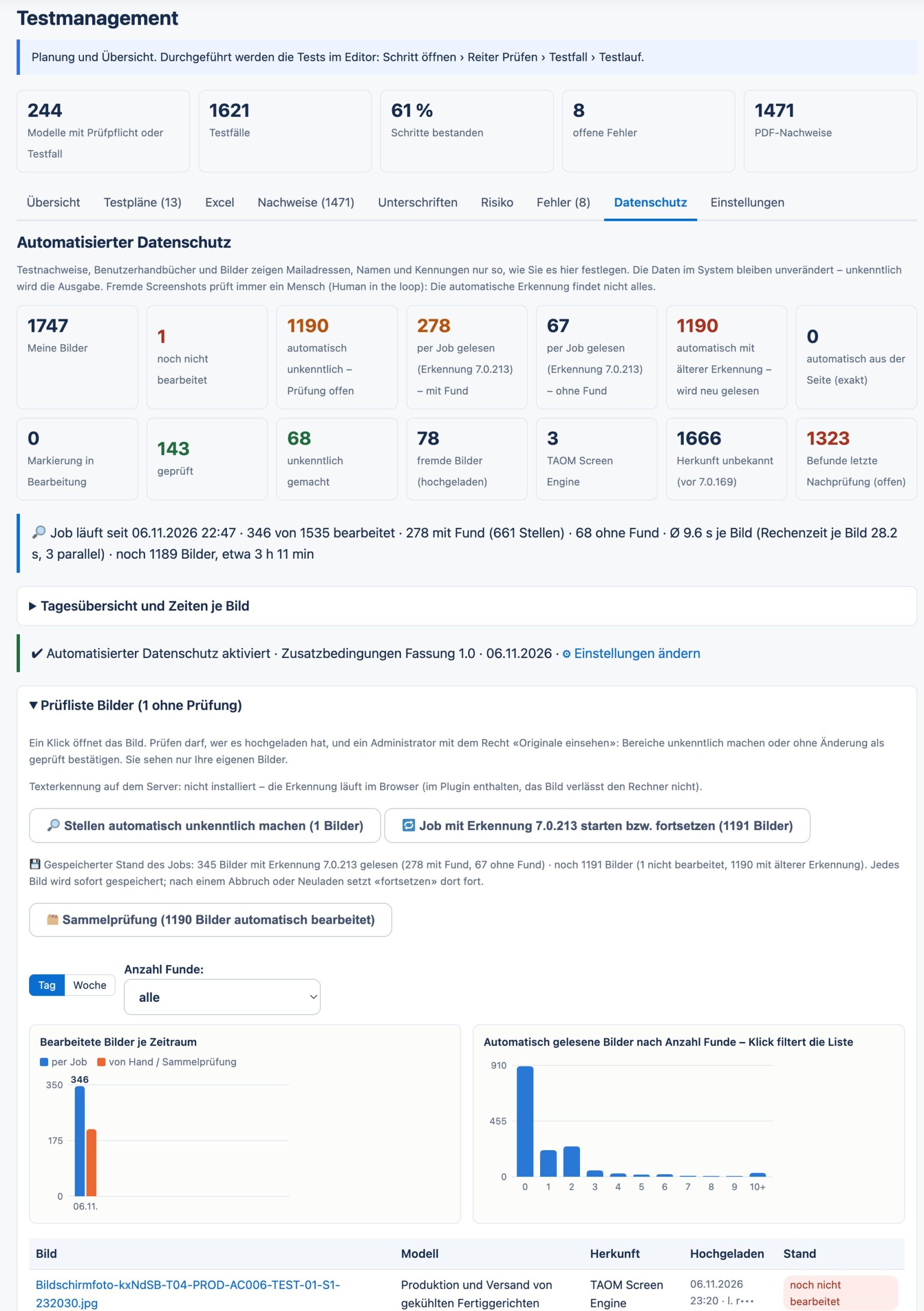
The TAOM Data Protection Screen Engine pre-checks new and existing screenshots: a job reads the images in the background, makes spots found unrecognisable and marks images without findings. Progress is saved – an interrupted job resumes where it stopped.
During the test run, personal data can already be found right on the photo and further spots marked by hand. Whoever confirms the photo there as checked completes the review – with name and time.
Human in the loop: a person reviews samples – for example filtered by number of findings – and steps in for borderline cases: small print, unusual layouts, names that are also ordinary words. The final check is the approval of the test evidence.
TAOM Datenschutz Design Protection
Is there more to protect than the GDPR?
Data protection does not end with names and email addresses. Every company has knowledge that must not leave it and must be protected from third-party access. Yet every day, screenshots, test cases and manuals are created that show exactly this knowledge. What if the next piece of test evidence showed the design drawing of your new product?
Bills of materials
Which components, suppliers and quantities go into your product – and who sees them in the next test evidence?
Formulations and recipes
Your formulation is your capital. If it appears on a screenshot of a production step, it lies open to everyone in the manual.
Technical drawings and plans
Designs, floor plans, circuit diagrams: the device does not matter for the test – but it is still visible on the screenshot.
Terms and entire texts
Project names, code names, contract clauses: some words must not appear in any document that leaves the company.
Entire applications
Should no image at all from a CAD program or a laboratory system end up in test evidence or a manual?
Third parties and target systems
Evidence goes to auditors, suppliers or target systems (e.g. Jira, Confluence). Who may see what there?
And yet you need screenshots, test cases and manuals – for internal use, for audits and for onboarding. This is exactly where TAOM Datenschutz Design Protection comes in: what is protected stays protected, and the evidence is still created.
How it works
Define, detect, block – and still provide evidence
You upload examples of what is protected (protection patterns) and name applications from which no image may leave the company.
For every photo in the test run, TAOM compares the image with the protection patterns – even scaled down, enlarged or as an excerpt – and recognises blocked applications by their window title.
The photo is still saved, but completely obscured. The attempt is logged with photo, person, reason and time. If the protected part has been cropped away, the block no longer applies.
The PDF test evidence, the user manual and the viewer show a lock image with the notice «Protected». Only an administrator with the «View originals» right can release it.
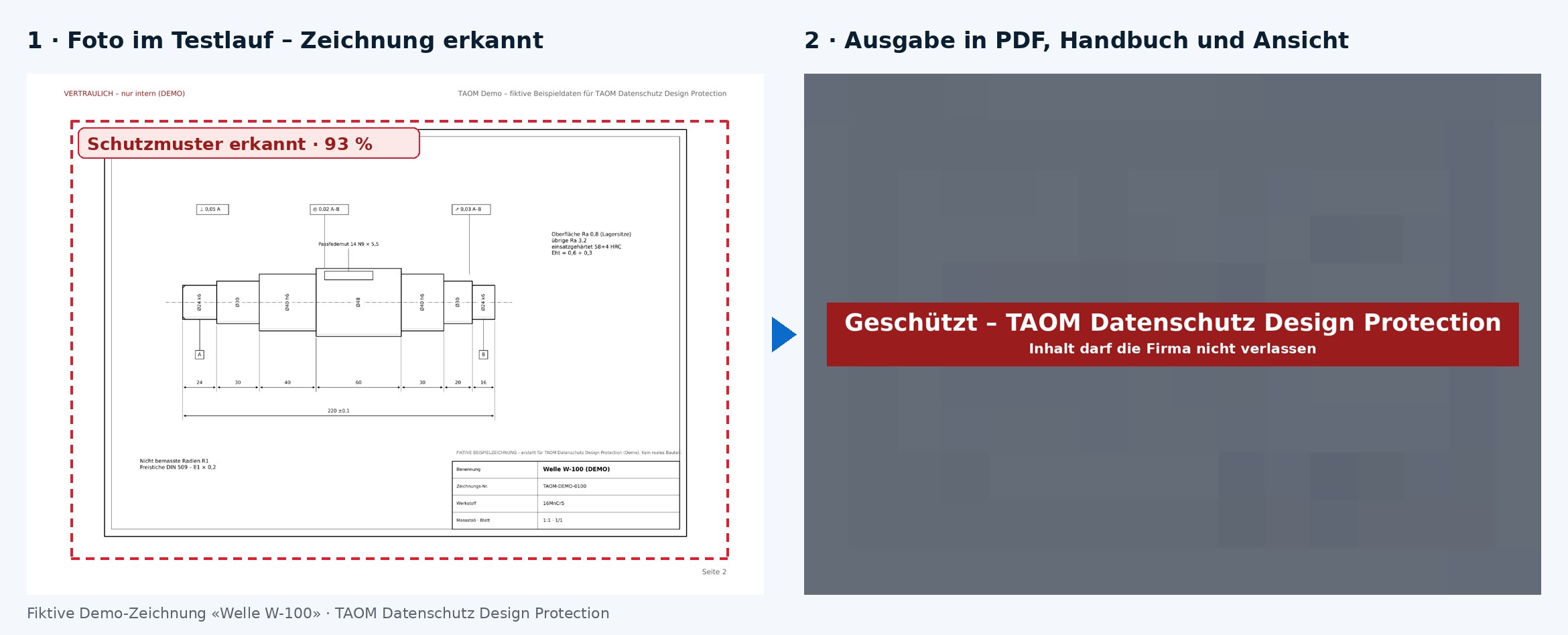
Limits, stated openly: what is detected is anything that resembles a protection pattern. Entirely new content without a pattern is protected by the application block. Human review remains – TAOM takes over the routine.
TAOM Demo – design documents (fictitious)
Fictitious sample documents with a technical drawing, building plan, 3D design, bill of materials and formulation (in German) – for trying out TAOM Datenschutz Design Protection.
Signed test evidence – Design Protection (TN-01279)
The real PDF test evidence from the live test: the blocked photo as a lock image, digitally signed, with document seal. Fictitious sample data, in German.
TAOM Data Protection Content & Logs
Logs in the customer’s hands
Every piece of software records who did what and when. With TAOM, you decide what is stored about your employees, who may see it and how long it is kept. For us, data protection does not start at export but where the data is created.
Placeholders instead of names
Names, logins and email addresses become «Person 1», «Person 2» as soon as they are written. You choose the label. Only those with the right may reveal them.
Matrix per log type
Changes, incidents, errors, exports, screenshots, AI agent: for each type you decide how people appear and how long entries are kept.
Terms and keywords
Project names, code names, part numbers: entered once, obscured in logs, evidence, manuals, photos and for the AI agent.
Safety net
A follow-up run rechecks existing logs and protects anything still in plain text. Tiles show the result at a glance.
Rights per person
Who may view logs and who may reveal people is set in field control – person by person.
Target systems and documents
What goes to target systems (e.g. Jira, Confluence) and channels follows the same setting. PDF and Word carry ID and classification in the document properties.
Your company, your rules. Without a setting, everything stays as usual. TAOM suggests values – you decide. Each company has its own setting; other customers are not affected.
Second safeguard
The approval workflow checks once more
Test evidence (PDF)
Before test evidence is valid, it is approved and digitally signed. Whoever signs sees it exactly as it leaves the house – with the unrecognisable spots.
User manual
The user manual goes through the same approval: a second person reviews before it is distributed.
Four eyes, provable
Detection, human review and approval interlock – every stage logged. More in Testing and verification and Compliance & Governance.
Critical questions
Three review points, answered openly
Not new features, but the questions an audit asks first.
AIs masked information really removed – or just covered?
Removed. TAOM does not lay a black rectangle over a spot, but creates a new image version. At marked spots it no longer contains any pixels of the original – not even reduced or blended. What can be seen there cannot be computed back to the original.
Texts in PDF and Word are replaced before the document is created: no selectable original text underneath, no hidden layer, no comments or tracked changes with the original. The original remains protected in your storage – only those with the right may view it, and every retrieval is logged.
A technical negative test in test management proves this: it reads the output versions by machine and shows that the protected details cannot be restored.
BWhat happens to documents that are already approved or signed?
They are never changed afterwards – that would break the signature. If a data protection rule changes, the re-check reports the affected documents. At your request a new version is created with today’s rules; it is presented for signing again.
The old version remains visible in the history with its checksum – its content is blocked for data protection reasons. This keeps it traceable what applied when, without old personal data remaining retrievable.
CWhere does automatic detection take place?
Exclusively within TAOM. Detection works without AI and without external services, using software supplied by TAOM itself. There is no transfer to third parties, no additional processor and no transfer location outside TAOM for this step.
If you also use the AI agent, TAOM filters out personal data and your blocked terms before sending. Which data is processed where is described in the privacy policy and the Trust Center.
Where the data goes – and back
One cycle, one rule
User manual
The test run produces the user manual – with the same screenshots. What was reviewed in the test run appears in the manual only in the reviewed version.
Information protection
Information protection & classification governs who may see and download what. Automated data protection governs what is in what leaves the house.
Target systems and return path
What lands in Jira, Confluence or another target system and comes back from there follows the rule you define per system.
Your project
Do the maths yourself
Enter your project scope – the calculator shows the manual effort, the effort with TAOM and the possible saving.
Example calculation with your assumptions, no commitment. In test operation, 597 of 1,691 images (35 %) contained spots with personal data.
Risk calculator
How high is your risk?
Play with your figures: how many personal details are travelling in your documents – and what could a leak cost, with and without automated data protection?
Model calculation with your assumptions – no commitment, no legal or insurance advice. Affected persons: at most about 1.5 times the employees (employees and external contacts). This is not a TAOM cost but the damage that would remain after a leak. «Residual damage with automated data protection»: 5 % of the details remain recognisable (assumption for automatic detection plus human review). Industry factor: assumption, higher for regulated industries.
Cross-check with study figures
Same leak probability and industry – but calculated with the average values from the studies instead of your assumption per person.
| Key figure from the studies | Study value | For you per year |
|---|---|---|
| Average cost of a data breach (Germany) | EUR 3.87 million | – |
| Global average | USD 4.44 million | – |
| Phishing as entry point | 14 % of cases · on average EUR 4.15 million | – |
| Fine ceiling GDPR · revFADP | up to EUR 20 million or 4 % of annual turnover · up to CHF 250,000 personally | – |
Key figure: – risk per employee and year (study value)
The study values are averages across all company sizes and causes – they show where a single incident can lead. Sources and context: table «What it costs – with and without» below.
Benefit, effort and risk
What it costs – with and without
Every test run produces screenshots, every model shows who approves what. Exactly this content makes a document valuable – and valuable to attackers.
| Task | By hand | With automated data protection |
|---|---|---|
| Review a screenshot and black out spots | open, search, black out, save – about 2 to 3 minutes per image* | spots suggested, visual check and confirmation – about 15 to 20 seconds per image* |
| Example: 1,000 screenshots in a project | about 33 to 50 hours* | about 4 to 6 hours* |
| Names and addresses in evidence, manuals, mails | review each document individually | automatically according to your settings, every time it is generated |
| Settings change | review all existing documents again | re-check reports only the affected documents |
| Proof towards audit and supervisory authority | hard to prove | settings, review and confirmation logged, confirmation sealed |
* Example calculation based on assumptions, not a commitment. Your effort depends on image size, content and routine.
The risk factor
Mail addresses + roles
Whoever knows who approves writes convincing phishing mails – in the name of exactly that person.
Names + responsibilities
An organisation chart with process roles is a template for social engineering and CEO fraud.
User names and identifiers
Known login names are half the work for login attempts.
| Key figure | Value | Source |
|---|---|---|
| Average cost of a data breach in Germany | EUR 3.87 million | IBM Cost of a Data Breach 2025 |
| Global average | USD 4.44 million | IBM Cost of a Data Breach 2025 |
| Phishing as entry point (Germany) | 14% of cases, on average EUR 4.15 million | IBM Cost of a Data Breach 2025 |
| GDPR fine | up to EUR 20 million or 4% of worldwide annual turnover | Art. 83 GDPR |
| Fine in Switzerland (revFADP) | up to CHF 250,000 for responsible persons in case of intentional violation; notification to the FDPIC in case of high risk | FADP Art. 24, 60 ff. |
Sources: IBM Newsroom, 30 July 2025 · PwC Switzerland on the revFADP. Not legal advice.
What is not in the document cannot leak. Automated data protection does not replace security measures – it ensures that a leaked document reveals as little as possible.
Human in the loop. Automatic detection is an aid, not a guarantee. External screenshots – uploaded or captured from other applications – are reviewed and confirmed by a person in your organisation before they appear in documents; until then TAOM outputs them only unrecognisably. Responsibility for review and approval lies with you as the controller under the GDPR and the revFADP. The supplementary terms «Automated data protection», which you confirm when activating, are authoritative.
Licence
Part of «Testing and verification»
Automated data protection is part of the add-on licence Testing and verification. More on protecting your content: Information protection & classification · Digital signature · Trust Center · Compliance & Governance · Verify a document.
Frequently asked questions
Are masked details in TAOM really removed or just covered?
Removed. TAOM creates a new image version that no longer contains any pixels of the original at marked spots. Texts in PDF and Word are replaced before creation – without hidden layers, comments or tracked changes containing the original.
What happens to signed documents when a data protection rule changes?
Signed documents are never changed afterwards. A new version is created and presented for signing again; the old one remains visible in the history with its checksum, its content blocked for data protection reasons.
Where does automatic detection of personal data take place?
Exclusively within TAOM, without AI and without external services. For the AI agent, TAOM filters out personal data and customer-defined blocked terms before sending to the language model.
Does the data protection check in TAOM need an external AI?
No. Detection, replacement and masking run with defined, traceable rules within TAOM. Each company can extend detection with its own block list.