TAOM™ Collaboration
No one understands a process alone.
Some people know how the work actually gets done. Others understand the systems, the rules, or what needs to be built. Collaboration here does not mean moving boxes around together – it means bringing these perspectives together in the same model. At the same time, knocking instead of barging in, and without anyone overwriting someone else’s work.
Live from the Editor
Two people, one model – from start to finish
On the left, one person is working in the model; on the right, the other joins: knocking, being let in, seeing who is working on what, changing things together, leaving. Not an animation, but a recording from TAOM Process Studio. The screens show the German user interface.
Live recording from TAOM Process Studio with sample data · left: the person in the model, right: the person joining · 1:40, plays in a loop
Who contributes
8 perspectives, one truth
Everyone is convinced that their view is the right one – and usually each is partly right. The whole truth only emerges when all eight come together in the same model. That is why it is not about who holds the pen.
The most expensive boundary
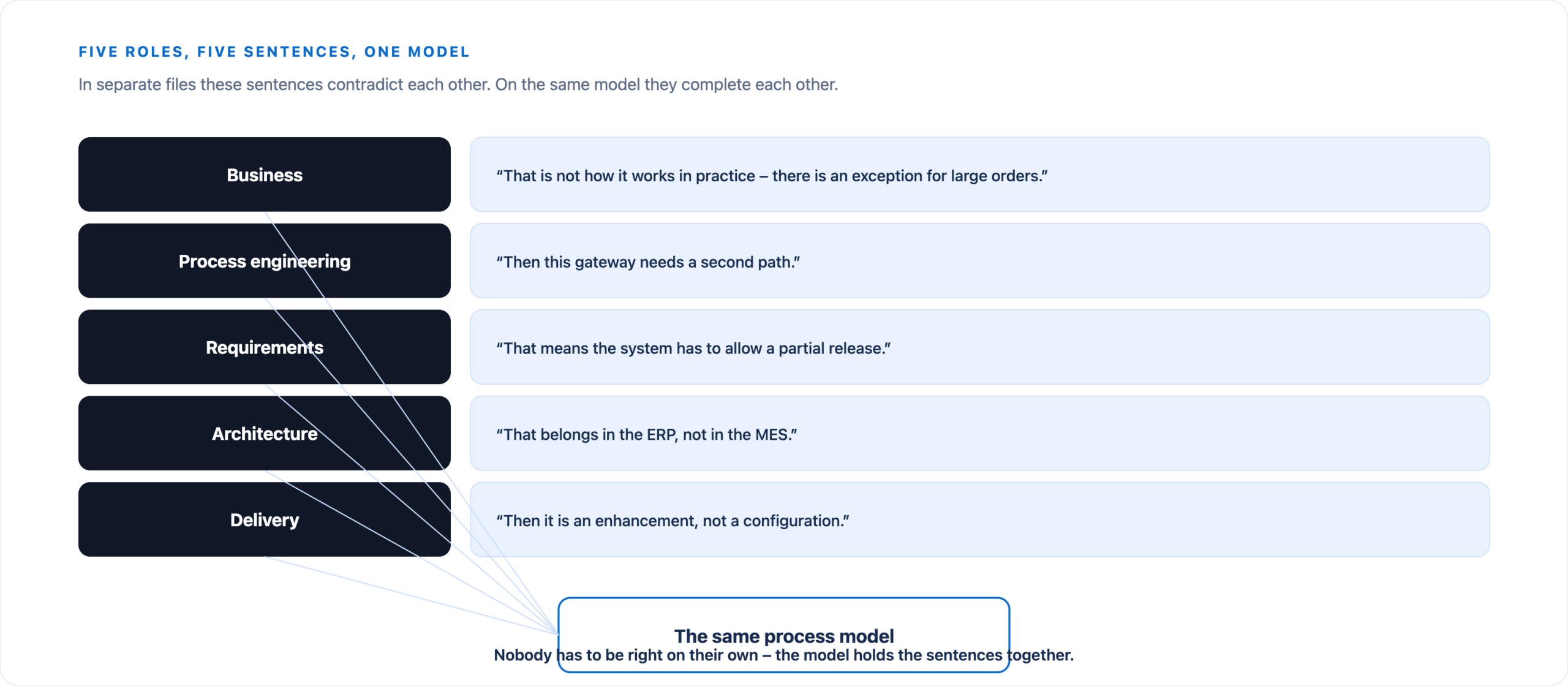
Business and technology talk about the same thing – just in different languages
Every role describes the same reality from a different perspective. As long as those statements live in separate files, they contradict each other. Attach them to the same model, and they begin to complement each other.
What really matters
Seven questions a team needs to answer
Sharing a file answers none of them. In TAOM, the answer sits where the question arises – on the model and on the step.
- What changed?The history on the step shows every change with time, before and after. Versions of the model can be compared.
- Why was it changed?Every change carries its source – manual, from the agent, or as a proposal from a test case (process re-engineering, page in German).
- Who still needs to review it?Review status on the step, “may change” and “may approve” roles from the field control (page in German), open tasks per person in Reporting.
- Which requirement resulted from it?Requirements sit on the step and go to the target system (e.g. Jira) with the same identifier – feedback from there arrives in Incoming changes.
- Which system is affected?ERP component and ERP functions are on the step; the attribute directory shows everywhere a transaction is used.
- Which information came from AI?The data origin is shown on every step (AI-generated, human-created, human + AI …); the provenance seal records what was edited in TAOM.
- Which version is currently authoritative?The approved model version. New parts remain a draft until the process owner approves them – under the four-eyes principle.
- And who is in the model right now?Initials in the toolbar and on the element being edited – see above.
AI has a seat at the table
A proposal is not an approval
Collaboration no longer happens only between people. What matters is that AI involvement remains visible – otherwise, you end up with a result that nobody can explain.
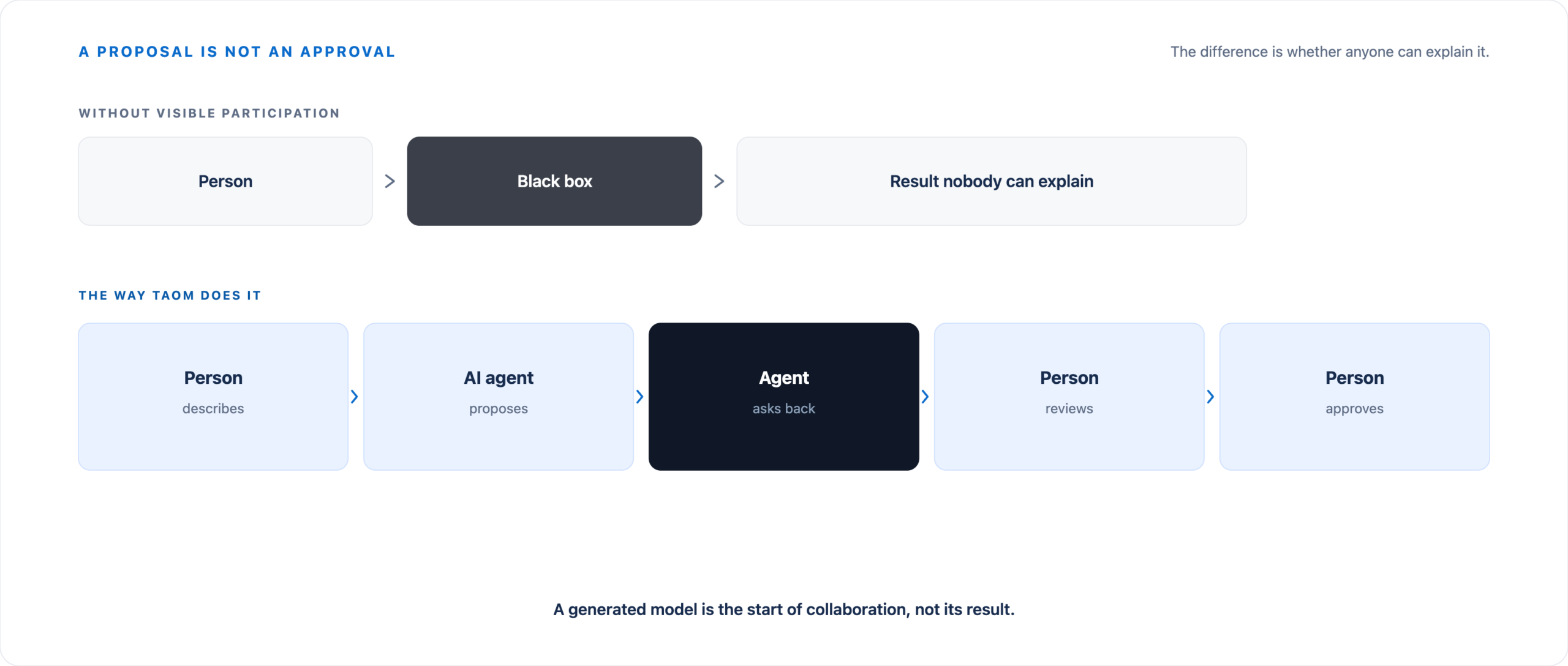
An AI-generated model is the beginning of collaboration, not its final result. The path is:
- AI proposal
- Business review
- Process review
- Technical enrichment
- Testing
- Approval
Everyone contributes their expertise without losing the original context – learn more about the Agents.
What is available in the tool today
Working at the same time – without overwriting each other
Several people work on the same model at the same time. Rules that the Editor enforces itself make this possible – nobody has to remember them.
Knocking instead of barging in
Anyone opening a model in which someone is already working knocks first. The person in the model says “Come in” or “Not now”. After a “Not now”, a short pause applies before knocking again.
The answer arrives even while you are waiting on the start screen.
Seeing who is working on what
Every person has initials and a colour – in the toolbar and directly on the element they are editing (orange dashed). Each browser window counts as its own session.
A window in the background does not hold on to a lock.
Lock on the element, with a name
The element someone is working on is locked for the others – with a name: “Andrea is editing this element right now.” The step window still opens – view only; fields and “Apply” are locked.
As soon as the element is free, the message disappears.
Saving merges
What others save appears without reloading – “Changes by … applied”. Your own unsaved work is kept; when you save, both states are merged.
Only if two people changed the same element does TAOM ask: my version or theirs.
Leaving really disconnects
With “Leave” or “Close model” you are gone at once: no more initials for the others, all your locks released. Anyone who wants to come back knocks again.
Closing the browser signs you out as well.
Original, history and provenance
On the left the unchanged source file, on the right the working version. The history on the step shows who changed what and when; the provenance seal records what was generated by AI and what was edited in TAOM.
Two questions stay answerable: where did we start – and what has changed since?
Versions and approval
A model has versions. New parts remain a draft until the process owner approves them – optionally under the four-eyes principle. Who may change and approve what is set by the field control per company.
Field control – who may do what (page in German) →Telling the team where things stand
After an approval, TAOM reports it as an issue in the target system (e.g. Jira) or as a card in the channel (e.g. Microsoft Teams). Feedback from the target system arrives in the model’s Incoming changes.
Explore integrations →What is still missing
Comment threads on the shape and a small chat in the model – including a “back in a moment” status – have not been built yet. Neither have teams across company boundaries.
The order is deliberate: first write together safely, then talk about it. A mechanism that loses work would be worse than none.
Prices and packages · Feature matrix
Collaboration beyond the model
Check, test, evaluate – on the same process
Those who work together on the model keep working together afterwards: in testing, in the manual, in the numbers. Everything sits on the same step – with the same identifier.
Testing and verification
Verification duty, risk, test case and test run with screenshot on the step. Testers and process owners see the same state; defects go to the target system.
Testing and verification →Process re-engineering
If a test run deviates from the model, TAOM detects it. The team’s answer becomes a draft that the process owner approves.
Process re-engineering (German) →User manual
Test cases and screenshots become a manual per process – in up to four languages. The team proofreads instead of starting from scratch.
User manual from the test run →Reporting
Tasks per person and role: approvals, rework, open tests. One click leads from the report back to the process step.
Reporting →Process Mining and project times
Processing and waiting times on the step, plan and actual per activity and role – so the team sees where the process waits and where implementation takes time.
Process Mining and project times →Enterprise process model
Every model has its place in the process landscape. Everyone knows where a process belongs and which models are evaluated together.
Enterprise process model →Instead of seven repositories
One connected context, not seven separate files
What it usually looks like
The process model is in one file. Requirements are in a spreadsheet. The backlog is in the delivery system. Specifications are in documents. Meeting notes are in email. The architecture diagram is in a presentation. The AI conversation sits in a chat window.
Each one may be correct on its own – but together they do not provide a coherent picture.
How TAOM holds it together
The tools can remain. What becomes visible is how their information is connected – using the process as the shared point of reference, on which people work at the same time.
Collaboration therefore becomes part of the Digital Twin rather than a separate feature alongside it.
Getting started
Take one process and bring the right people together
Start with a process that someone already needs to explain. Bring in the people who know it – they knock, you let them in. Let AI do the groundwork where it saves time. Then review the result together.