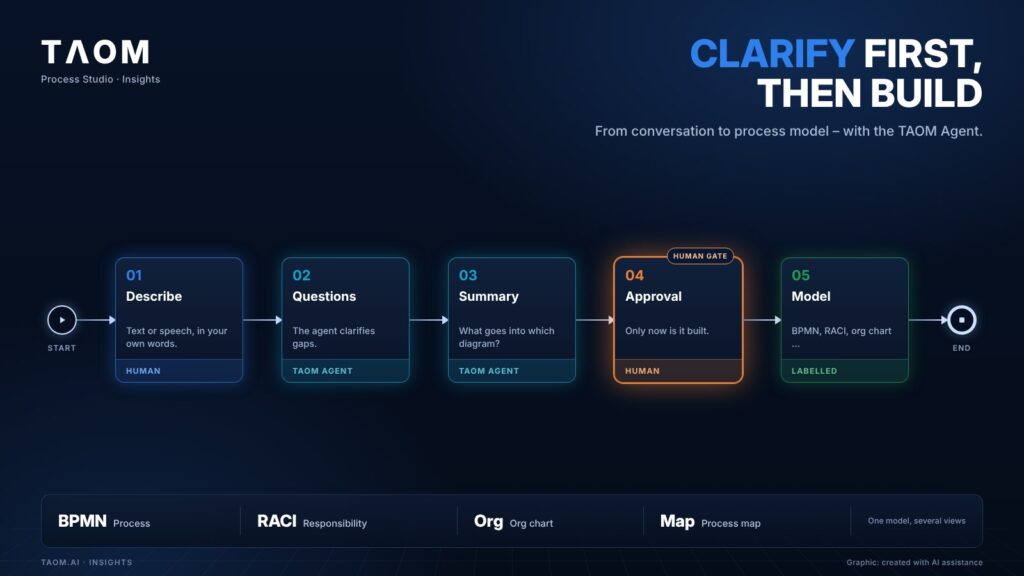
After workshops, duplicate work often begins: model, requirements, documentation and implementation continue in different tools – and drift apart. The Process Studio Editor starts earlier: with the conversation.
In your own words
You describe a process in text or speech, just as you would explain it to a new colleague. The TAOM Agent turns it into a standards-compliant model: BPMN process, organisation chart, process map, RACI matrix or system landscape – with the AI contributions labelled.
BPMN 2.0 (Business Process Model and Notation) is the widely used standard for process diagrams – readable for experts and for other tools.
Why the agent asks first
Processes are rarely cleanly defined. If you draw straight away, you draw the gaps too. That is why the agent clarifies in rounds and presents a summary at the end: Have I understood everything? Do you see further points? Building only starts after your explicit approval.
The summary also states which part goes into which diagram. Better several small models with a fixed place in the enterprise process model than one huge wallpaper.
Two things the agent cannot guess
The agent only reads your text. Two details therefore need to be stated explicitly: the orientation (without it, the diagram is built top to bottom; for landscape, a word such as “landscape” is enough) and the type of diagram (without it, a BPMN process is created; for a RACI matrix, an organisation chart or a process map, one sentence is enough). It recognises the industry, roles and systems by itself.
And how long does the Editor wait for your answer? As long as you like: if no grace period is set, it waits indefinitely. Building on automatically is possible, but it is a deliberate setting and not the default.
Capture once, use everywhere
What is recorded at the step is not written again. Requirements, risks and test cases are attached to the process step, and target systems (e.g. Jira, Confluence) work with the same identifier.
The human stays in the loop – not as a check at the end, but as a partner from the start.
In short
The TAOM Agent turns a description into a model – but only after it has asked questions and you have approved the summary. The result is a model that is right rather than one that was quick.
About TAOM: TAOM is the method and platform of Traniva AG (Switzerland) for people, processes and AI working together – with Process Studio Editor and Viewer, TAOM Training and Support. Our principle: AI supports, responsibility stays with people.
Read more: From conversation to process · Try the Editor without signing in · Learning video: From process description to BPMN model
Leave a Reply