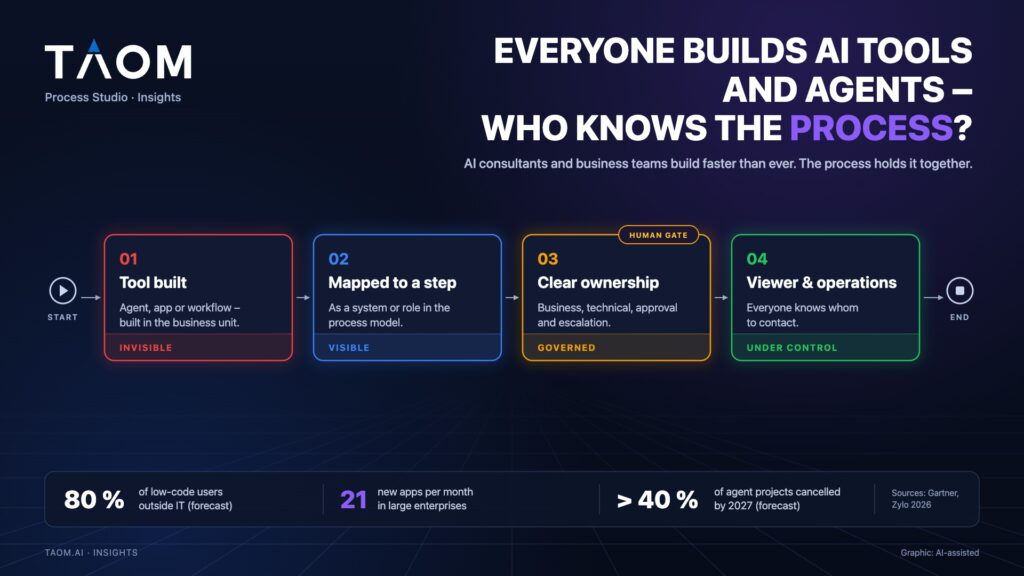
With AI, every business unit now builds its own AI tools and agents: an agent that pre-checks incoming invoices, a workflow that pushes orders from the mailbox into the ERP, a small app for the exceptions list. What used to be a project with a concept, development and a transport now takes an afternoon. That is real progress.
This freedom has created a new profession: AI consultants who help business units build – often former SAP and IT consultants, often people from the business itself. They deliver fast and close to the need. Rarely does anyone ask the question behind it: who knows the process in which all these tools operate – and who will run, maintain and be accountable for them tomorrow?
This article contrasts the old world of the single-system landscape with today’s variety of tools, shows where the chaos comes from, and how to get it back under control with the process as the organising principle.
Open a finished demo model in the Viewer – no sign-in needed. Or create your first model in the Editor.
Start Process Studio ViewerStart Process Studio EditorWatch the training
The old world: one system, one process
For many companies, SAP was the process landscape itself for two decades. Purchasing, warehouse, production, sales and finance ran in one system, on one data model, with one authorisation concept. Whatever the standard could not do was built as an enhancement, described as a WRICEF object and delivered through the same transport path.
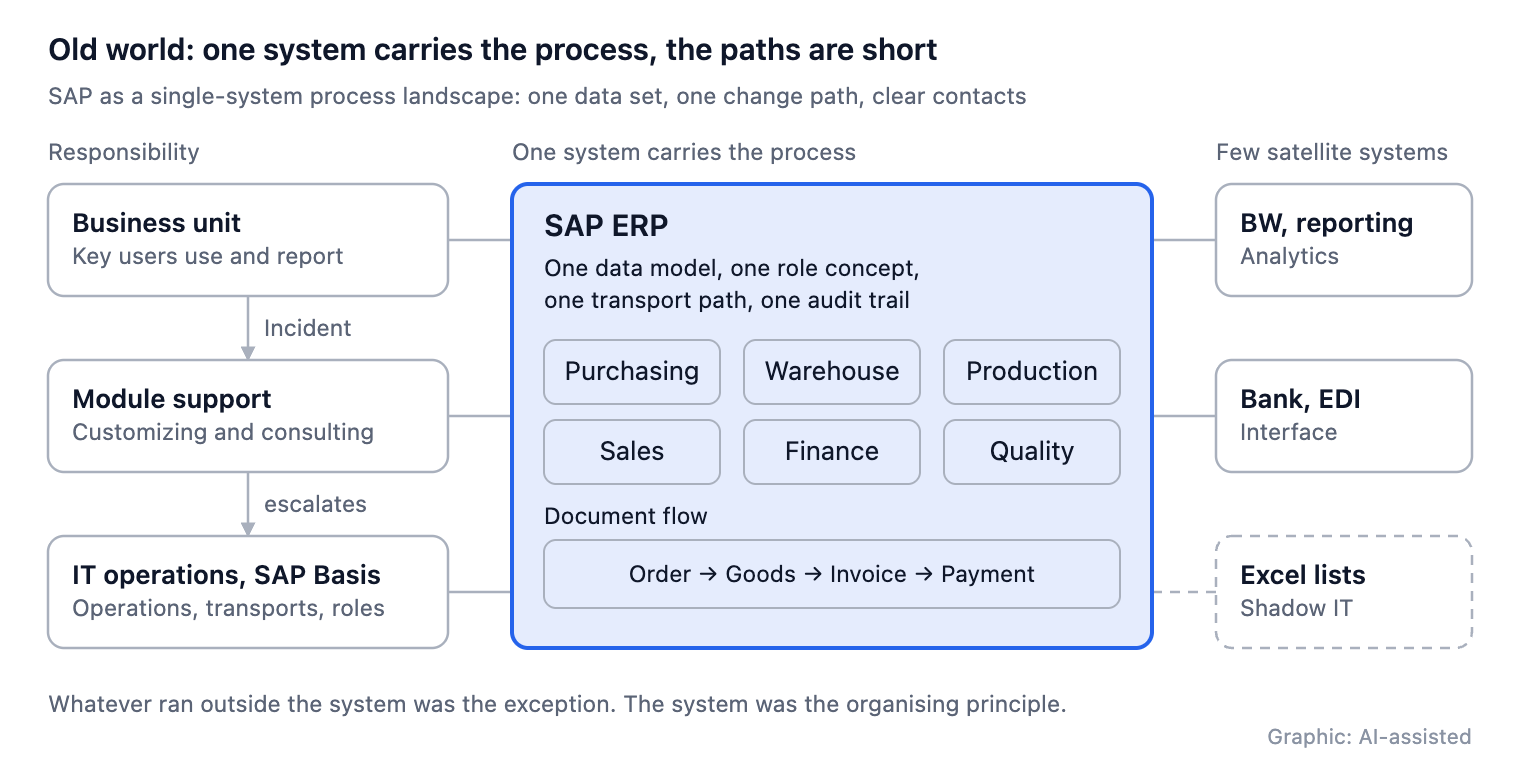
Anyone who has worked with it knows the advantages:
- One data set. One material, one business partner, one document – across all process steps.
- One path for changes. Development, quality assurance, production; every change traceable as a transport.
- Clear responsibilities. Key users in the business, module support and consulting, SAP Basis in operations. Anyone with a problem knew whom to call.
- One audit trail. Document flow, change documents and authorisations in one place – for internal and external audit.
The disadvantages are just as familiar:
- Rigid. Changes took months, and the business blueprint often ran to several hundred pages.
- Expensive. Every enhancement went through consulting, development and testing.
- Dependent. Knowledge sat with a handful of specialists.
- Never quite complete. Excel lists, Access databases and approvals by email lived alongside the system – the first shadow IT.
The most important point is a quiet one: the system was the organising principle. Whatever did not run in SAP was the exception.
If you wanted to understand the process, you looked at the document flow. How the blueprint has since evolved into fit-to-standard and beyond is described in Business blueprint then and now.
The new world: tools, agents and interfaces
Today the picture is different. The ERP remains, but it is no longer the place where the process runs completely. SAP itself recommends a lean core with its “clean core” approach: enhancements should be built outside the ERP, on platforms alongside it. On top come cloud applications per business unit, low-code apps, automation platforms, copilots and AI agents – each with its own login, its own data and its own interface.
The figures show how fast this is happening:
- Gartner expects that in 2026 at least 80 percent of low-code tool users will work outside formal IT departments, up from 60 percent in 2021 (InfoWorld).
- According to Zylo’s 2026 SaaS Management Index, large enterprises add an average of 21 applications per month. Business units control 81 percent of SaaS spend, IT directly only 15 percent – and the app most often paid for via expenses is ChatGPT (Zylo).
- At the same time, Gartner expects more than 40 percent of agentic AI projects to be cancelled by the end of 2027 – because of rising costs and unclear value (Reuters, via The Star).
Interfaces are back in fashion – only this time they are not planned by an integration team but emerge on the side. A mail rule, a connector, an agent with read access to the ERP: each of them is a handover in the process. None of them is in the process model.
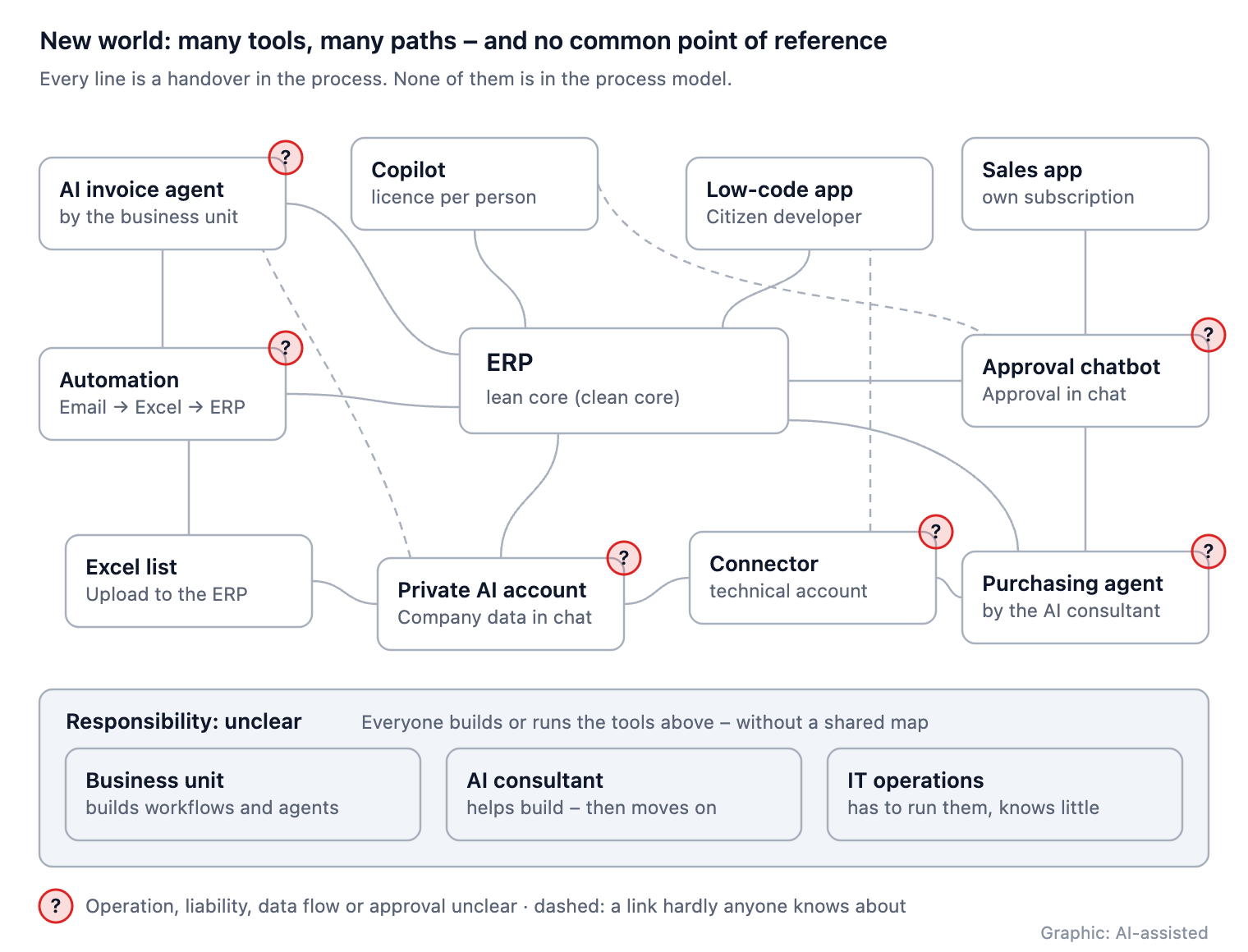
This is no criticism of those who build. It is the logical consequence when building becomes easy and documenting stays hard. And every cancelled agent project leaves something behind: a connector, an account, half a workflow that no one will remember in a year.
The new profession – and the creeping shift
The AI consultant is the most visible new role. They stand between business, IT and vendors, build prototypes, connect tools and advise at the same time. Many come from SAP consulting and bring process knowledge; others come from the business and bring speed. Both are valuable.
The tricky part is not the role but how it emerges. The shift does not happen by decision but by doing. Nobody signs off that the business unit now runs part of IT, or that a consulting engagement has turned into permanent operations. It simply happens – agent by agent, workflow by workflow.
| Role | Before (single-system world) | Today (tool world) | Open question |
|---|---|---|---|
| Business unit, key user | uses, tests, reports | builds its own workflows and agents | Who runs what the business has built? |
| SAP module consulting | customizing, specification, acceptance in the standard | becomes the AI consultant, builds next to the core | Who maintains the solution after the project? |
| AI consultant (new) | – | connects business needs, models and tools, often project by project | Where is it documented what was built – and why? |
| Citizen developer (new) | Excel macros on the side | low-code apps and automations with company data | Who checks authorisations and data flows? |
| IT operations, SAP Basis | one system, one transport path | many accounts, connectors and licences, often unknown | How do you run what you do not know? |
| Enterprise architecture | system landscape on one slide | landscape changes every month | Which map is still correct today? |
| Process owner (GPO) | owns the process in the system | process spreads across many tools | Does the GPO know which tools work in their process? |
| AI agent (new) | – | performs steps, partly decides on its own | Who approves, who is liable, where does it escalate? |
None of this means going back to the old order – nobody wants that. But someone has to keep the map. And that map is the process, not the tool list. What an agent may decide on its own is explored in What may an AI agent decide?; how individual assistants become a governed workforce is described in From copilot to AI workforce.
What a new tool means for the process
Every tool is a process step – even if nobody calls it that. If an agent pre-checks invoices, the process has changed: there is a new step, a new handover, a new decision and new data flowing.
Five things change, mostly unnoticed:
- Invisible steps. The agent pre-checks, the script reconciles, the bot collects the approval. The model still says “Check invoice” – without saying who or what does it.
- More handovers. Every interface has a format, a timing and a failure case. Who decides what happens when a handover does not arrive?
- Knowledge moves into prompts and workflows. The customizing of the new world lives in prompts, connectors and workflow definitions – often in the personal account of whoever built it.
- Accountability blurs. An agent produces a result. Who checked it, who approves it, who owns the error?
- Changes without a transport. A vendor updates its language model, a cloud tool changes a feature – and the workflow behaves differently without anyone having requested a change.
So the process keeps running – only nobody knows exactly how any more. You do not notice it on day one, but on the day of the incident, at the audit or at the next system migration. How to make AI use visible at the step is shown in Where is AI already at work in your company?
The IT operations view: who maintains, who safeguards?
For IT operations the question is not whether a tool is useful, but what happens when it stops working. In the single-system world there were established answers. In the tool world they are often missing – not out of negligence, but because operations knows nothing about many of the tools.
| Topic | Single-system world | Tool world today | What is missing |
|---|---|---|---|
| Operation and monitoring | monitoring by Basis, jobs in the system | every tool with its own monitoring – or none | Who notices that a workflow has stalled for days? |
| Changes | transport with approval | changes directly in the tool, model updates by the vendor | Who knows what has changed since last week? |
| Authorisations | one role concept | accounts per tool, technical accounts, personal keys | Who has access to what – and with which account? |
| Data protection, data flow | data stays in the system | data flows into cloud services and language models | Which data goes where, on what basis? |
| Licences, costs | one contract, predictable | subscriptions per department, expenses, costs per call | Who pays for what – and who cancels? |
| Knowledge, documentation | specification, blueprint, transport description | in the head and the account of whoever built it | What happens when that person leaves? |
| Incident | ticket to module support or Basis | ticket to an IT team that does not know the tool | Who is 1st, 2nd and 3rd level? |
| Audit, evidence | document flow, change documents | results without origin, approvals in chat | Who created and approved what? |
| Replacement | migration as a planned project | nobody knows what depends on the system | What breaks if we switch the tool off? |
IT operations thus becomes the operator of things it neither ordered nor built nor received documentation for.
That is the real shift: the business takes over parts of IT – the liability often stays with IT.
What is needed, therefore, is one place that shows which tool works in which step, who owns it on the business and the technical side, and where an incident escalates.
The impact: speed first, then friction
The consequences come in waves. At first there is almost only good news – the friction shows only when the number of tools grows and the first people move on.
None of these consequences is inevitable. They arise where the speed of building meets an organisation that does not treat the process as the common point of reference. How to make the consequences of a change visible before deciding is described in Know the consequences before deciding.
The process as the organising principle
The system used to hold the landscape together. Today no single system can do that any more – too many tools, too many vendors, too much change. What remains is the process. It changes more slowly than the tools that support it, and it is what the business understands anyway.
If you know your process, you know whom to contact – or how the process handles it.
For that, the process step has to hold what is scattered today:
- What happens there and with what: role, system, tool, agent, interface.
- Who is responsible: business, technical, approval – and where it escalates when nobody is there.
- Which risk exists and which control mitigates it.
- How it was tested: test case, result, evidence.
- Where content comes from: created by people or generated by AI, with the person and time of approval.
Then the tool list becomes a map. The question “Which tools do we have?” gives way to a better one: “Which tools work in which step – and who is accountable for them?”
This is no plea against new tools and no return to the hundred-page blueprint. The TAOM method does not replace SAP Activate, Scrum, BPMN or TOGAF. It describes the context in which these disciplines, their artefacts, people and AI work together – from theory (THY) through operating system (OS), management (MGT), architecture (ARC) and engineering (ENG) to tooling (TOOL). More on the Method page.
How TAOM brings the chaos under control
TAOM creates order not with yet another system, but with a common point of reference: the process step with a stable ID. A few model and maintain in the Editor, everyone reads in the Viewer, and the tools stay where they are – linked via the step.
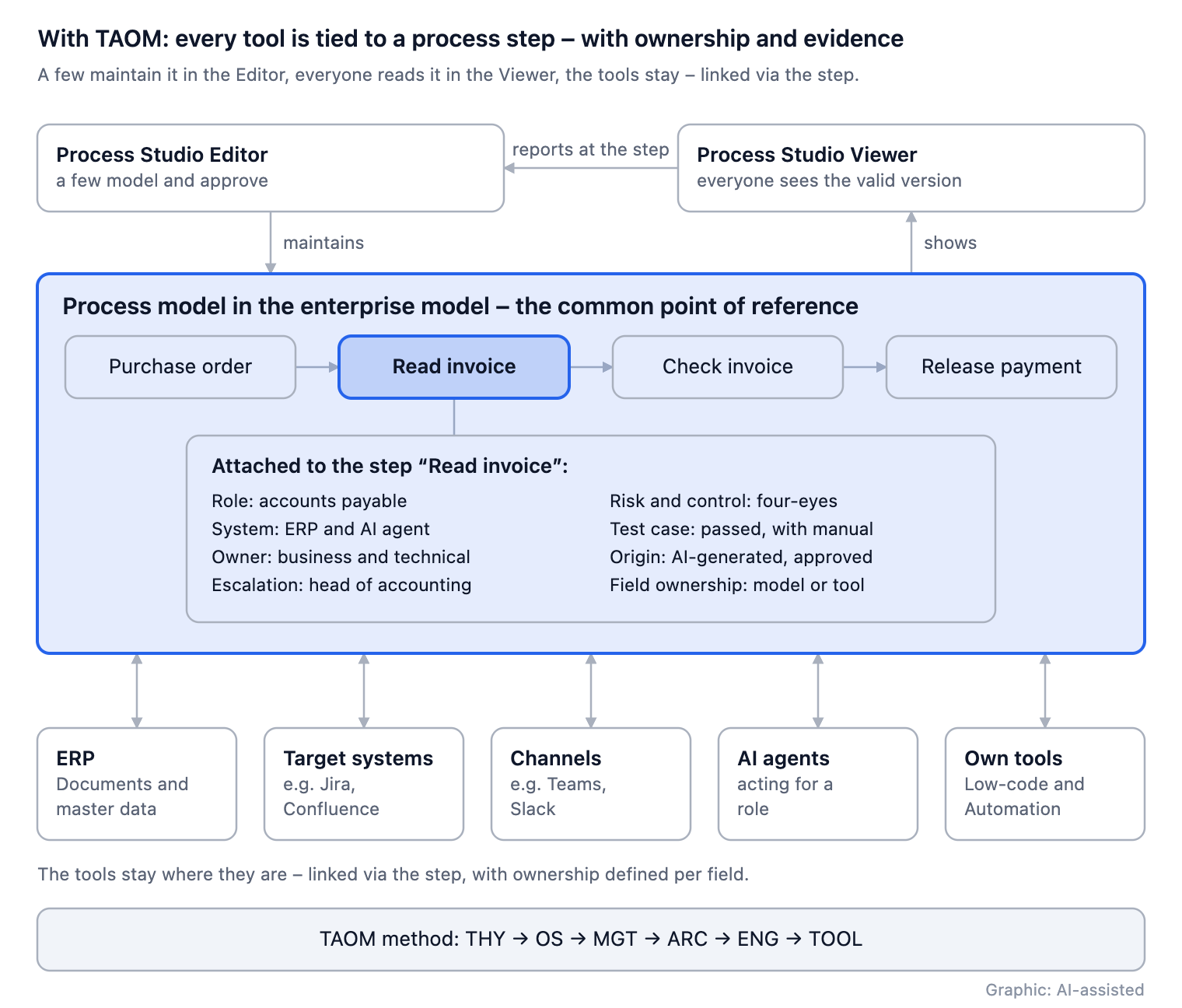
The chaos does not disappear because there are fewer tools, but because every tool has a place in the process – and the step shows who is accountable for it.
The demo model on introducing and approving an AI agent shows everything in one flow: AI steps with responsibilities, risks and controls, test cases, the manual, process mining and project times. No sign-in needed.
Start Process Studio ViewerStart Process Studio EditorWatch the training
New to TAOM? The film “What TAOM is” – in three and a half minutes
The building blocks
The questions from operations – and where TAOM answers them
| Question | Answer in TAOM |
|---|---|
| Which tools and agents work in process X? | “Requirements” process card in the Editor: system, tool and agent per step |
| Where is this tool used? | Attribute directory, across all models in the company |
| Who is responsible when it fails? | “Organisation” process card: RACI, responsibility profile, escalation |
| What is nobody responsible for? | Responsibility gap analysis, continuously rather than on request |
| Who created and approved the result? | Origin and approval at the step, provenance seal in every edited file |
| Has the step been tested? | “Review” process card: risk, control, test case, result |
| What happens if we replace the tool? | Attribute directory plus Change Impact against the valid version |
| Which value applies – in the tool or in the model? | Field control and field ownership |
| Whom do I tell that something is wrong? | Report in the Viewer, directly at the step, to the process owner |
To be honest
TAOM does not run your tools. It is not a monitoring system, a CMDB or IT service management, and it does not execute processes. TAOM makes sure it is known which tool works in which step, who is accountable for it and how it has been tested – the basis on which operations, support and audit can work at all. Not every function is included in every tier; the feature matrix shows what is included where.
Example: incoming invoices with AI
Before. Accounts payable is overloaded. With the help of an AI consultant, an employee builds an agent: it reads invoices from the mailbox, extracts supplier, amount and order number and puts everything into an Excel list that is uploaded to the ERP once a day. Approvals happen in the team chat. It works – for three months.
Then a supplier changes its invoice format, the agent reads the amount incorrectly, and the deviation only shows up at month-end closing. IT learns about a tool it does not know from a ticket. The AI consultant has long since moved on to the next engagement.
After – with the process as the point of reference. Same agent, same idea. But:
- The “Invoice to payment” model has its own step “Read invoice” with an ID, system and agent.
- Accounts payable is responsible on the business side, IT operations on the technical side; escalation goes to the head of accounting.
- The risk “amount read incorrectly” is named and mitigated: matching against the purchase order, four-eyes approval above a defined amount.
- A test case with sample invoices belongs to the step; the passed test run produces the manual.
- The approval is recorded in the model, not in the chat.
- In the Viewer, the whole team sees the valid process and reports anomalies directly at the step.
- If the tool is replaced, the attribute directory shows everywhere it is used.
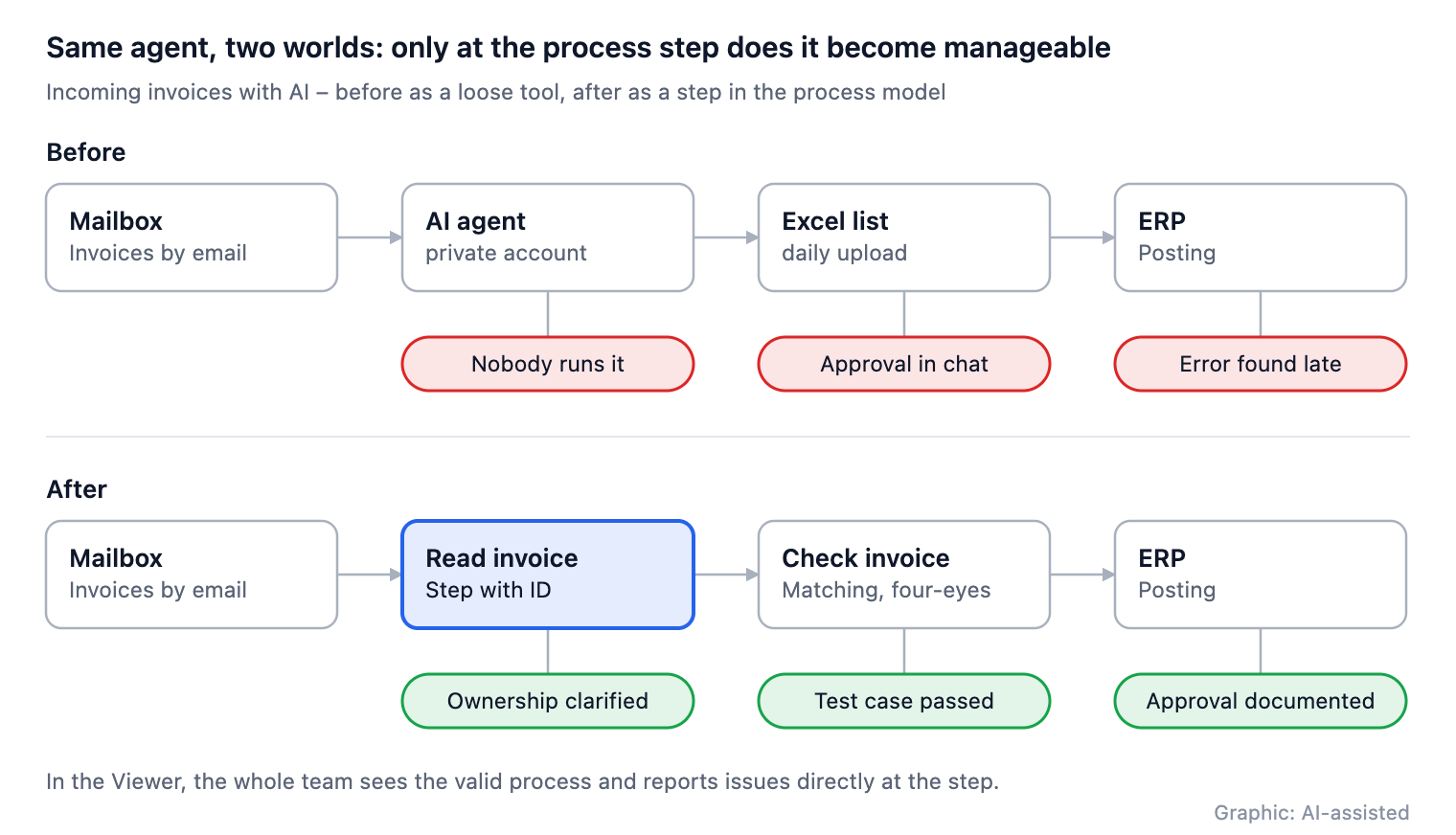
The agent is the same. What has changed is that someone knows where it works – and whom to call when it gets things wrong. The example is illustrative; each company defines the scope and roles itself.
Roadmap: six steps back to the big picture
- Start with a process that hurts right now. Not with a tool inventory across the whole company, but with a workflow where new tools or agents are emerging.
- Attach every tool to its step. Record agents, workflows, low-code apps, Excel lists and interfaces as a system or role at the step – not in a separate list.
- Clarify responsibility: business, technical, approval. And define where things escalate when nobody is there – for agents just as for people.
- Define ownership per value. Which system owns which field? What the model owns is not overwritten in the tool – and vice versa.
- Assess risk, add control and test case. Not every use is critical. But every critical one needs a control and evidence.
- Open the Viewer. Everyone involved sees the valid version and reports at the step what is no longer right.
One rule for everything new: no tool without a process step
Whoever introduces a new tool first attaches it to the step it supports. That takes minutes – and saves the search when it fails.
For AI consultants and SAP consultants this is not a brake but an argument: if you hand over your solution documented at the process, you deliver something that survives the change of engagement. Which questions should be answered before you start is covered in Five questions to answer before using AI.
And people? What makes you irreplaceable
With so much speed, a question comes up that is rarely asked out loud: if every business unit builds its own agents and AI takes over more and more steps – what are people still needed for? The answer is encouraging, and it lies in the process itself.
AI can describe, check and suggest. Three things remain with people – and TAOM records who did them:
This applies to everyone this article is about. The employee in the business unit who builds an agent is not replaced – she becomes the process expert who defines what the agent may do. The SAP consultant turned AI consultant brings what no model has: experience of how processes really run in practice. And IT operations does not become the fire brigade for other people’s tools, but a partner who knows what runs where. More on the TAOM for management page.
The new world does not need fewer people. It needs people where judging, deciding and taking responsibility happen.
“You Are Irreplaceable” – this was also the motto of LOOP 2026, the gathering of the Leaders of AI community in Munich. What we took away is in our LOOP 2026 review.
Training for the role that remains
Anyone who wants to introduce AI in their own organisation and take on the role that stays irreplaceable will find programmes such as the MBAI® or AI Integration Expert at Leaders of AI. View the Leaders of AI programmes (page in German)
Conclusion
The single-system world had its weaknesses, but one great strength: you knew where the process ran and whom to call. The new world is faster, closer to the need and more creative – and loses exactly this strength when nobody keeps the overall picture.
AI consultants and business units that build for themselves are not a problem to be solved. They are a force that can be steered. The lever is not another system and not a ban, but the process as the common point of reference: every tool at its step, every responsibility with a name, every change with an impact assessment. And people are not left over in all this – they move to where they matter: judging, deciding, taking responsibility.
In short
With AI, everyone builds their own tools and agents – and the process behind them disappears from view. TAOM ties every tool, every agent and every interface to the process step, with ownership, risk, control and evidence. A few maintain it in the Editor, everyone sees it in the Viewer – and if you know your process, you know again whom to contact. Those who judge, decide and take responsibility remain irreplaceable.
Look at it in the Viewer first, then model it yourself in the Editor – and learn step by step in Training.
Start Process Studio ViewerStart Process Studio EditorWatch the training
About TAOM: TAOM is the method and platform of Traniva AG (Switzerland) for the interplay of people, processes and AI – with Process Studio Editor and Viewer, TAOM Training and Support. Principle: AI supports, responsibility stays with people.
Read more: Where is AI already at work in your company? · Business blueprint then and now · What may an AI agent decide? · From copilot to AI workforce · What an enterprise digital twin is – and what it is not · TAOM for SAP transformation · TAOM for management · LOOP 2026: “You Are Irreplaceable”
Sources: Gartner forecast on low-code users outside IT (InfoWorld, 14 Dec 2022) · Zylo SaaS Management Index 2026 (29 Jan 2026) · Gartner on cancelled agentic AI projects (Reuters via The Star, 25 Jun 2025)
Leave a Reply